
Microsoft SharePoint Monitoring
From the server to the web pages: SharePoint resources, service, download speed and WMI counters checked in sequence, with SMS and email notifications.
From the foundations to the core: server, service and web pages
Monitoring Microsoft SharePoint with Sentinet³ is based on the Sentinet³ Template SharePoint and works in layers: first the server, then service availability, and finally the web pages.
The first check is the reachability of the machine: depending on the response, a dependency system allows or prevents the execution of the other checks. In the same way, before analysing the pages, Sentinet³ verifies that SharePoint is running: there would be no point in monitoring it if the service were unavailable.
Web pages are queried with authentication, while the service counters are collected via the WMI protocol.
| At a glance | |
|---|---|
| Pattern | Sentinet³ Template SharePoint |
| Protocol | WMI for SharePoint counters, authenticated requests for web pages |
| Sources | Server, SharePoint service and web pages |
| Scope | Server, network interfaces, service availability, web pages, WMI counters |
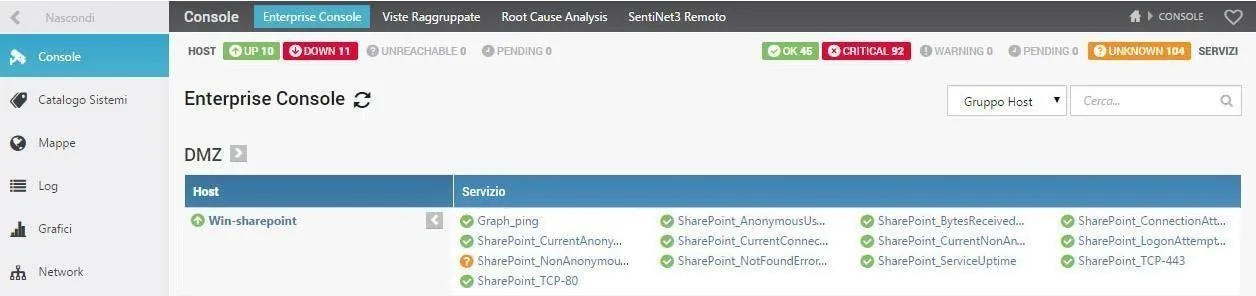
The Pattern’s checks
When thresholds are exceeded, Sentinet³ sends SMS and/or email to inform the people responsible.
Server
| Check | What it verifies |
|---|---|
| Reachability | The server responds on the network; the execution of the other checks depends on the result |
| Port 80 | Response to HTTP requests |
| Port 443 | Response to HTTPS requests |
| Ram | Percentage of RAM in use |
| Cpu | CPU utilisation |
| Proc | Running processes |
| ProcNum | Number of running processes |
| Disk | Percentage of disk space |
| Page_size | Size of a file |
| All_size_pages | Size of all files |
| Page_age | Creation date of a file |
| Networks | Valid interfaces of the server |
| Uptime | Server uptime |
| All_Driver_size | Capacity of all the server’s disks |
| Event_ | Application event log for the last 4 hours |
| Service_OK | Services started at boot |
Service availability
| Check | What it verifies |
|---|---|
| SharePoint running | SharePoint is active; only if it is does Sentinet³ move on to checking the web pages |
Web pages (with authentication)
| Check | What it verifies |
|---|---|
| SharePoint_ | Web page download speed in MB/s |
| SharePoint_ | Web page reachability |
SharePoint WMI counters
| Check | What it verifies |
|---|---|
| SharePoint_ | Anonymous users per second |
| SharePoint_ | Bytes received per second |
| SharePoint_ | Connection attempts per second |
| SharePoint_ | Anonymous users connected to the site right now |
| SharePoint_ | Current connections |
| SharePoint_ | Non-anonymous users connected to the site right now |
| SharePoint_ | Logon attempts per second |
| SharePoint_ | Non-anonymous users per second |
| SharePoint_ | Resource-not-found errors per second |
| SharePoint_ | Web server uptime |
Network interfaces
With a single query to the server, the Pattern returns for each interface: up or down status, IP address, MAC address, speed in Mbit, packets with errors, and inbound and outbound traffic.
Checks in sequence, targeted alarms
- Dependencies between checks: if the server is unreachable or SharePoint is not running, the subsequent checks are not forwarded.
- Page experience: pages are queried with authentication, measuring reachability and download speed.
- Immediate notifications: when thresholds are exceeded, Sentinet³ sends SMS and/or email to the people responsible.
Related topics
Want to see Sentinet³ on your infrastructure?
Tell us about your environment: sites, technologies, critical services. We will show you how Core and Infinity can work on your case.