
Security Insight
Host security and SIEM alerts read in the context of business services.
From alert to host, from host to service
Security Insight combines internal knowledge of the hosts with the events detected by the SIEM and makes them readable on topology and application maps. For each monitored machine, it helps you understand which services are exposed, which users access it, which processes are running and which security events affect business services.
- Host Security Analysis through the Sentinet³ Infinity agent
- SIEM Integration: alerts associated with assets and their dependencies
- Historical analysis with the Sentinet³ Core Time Machine
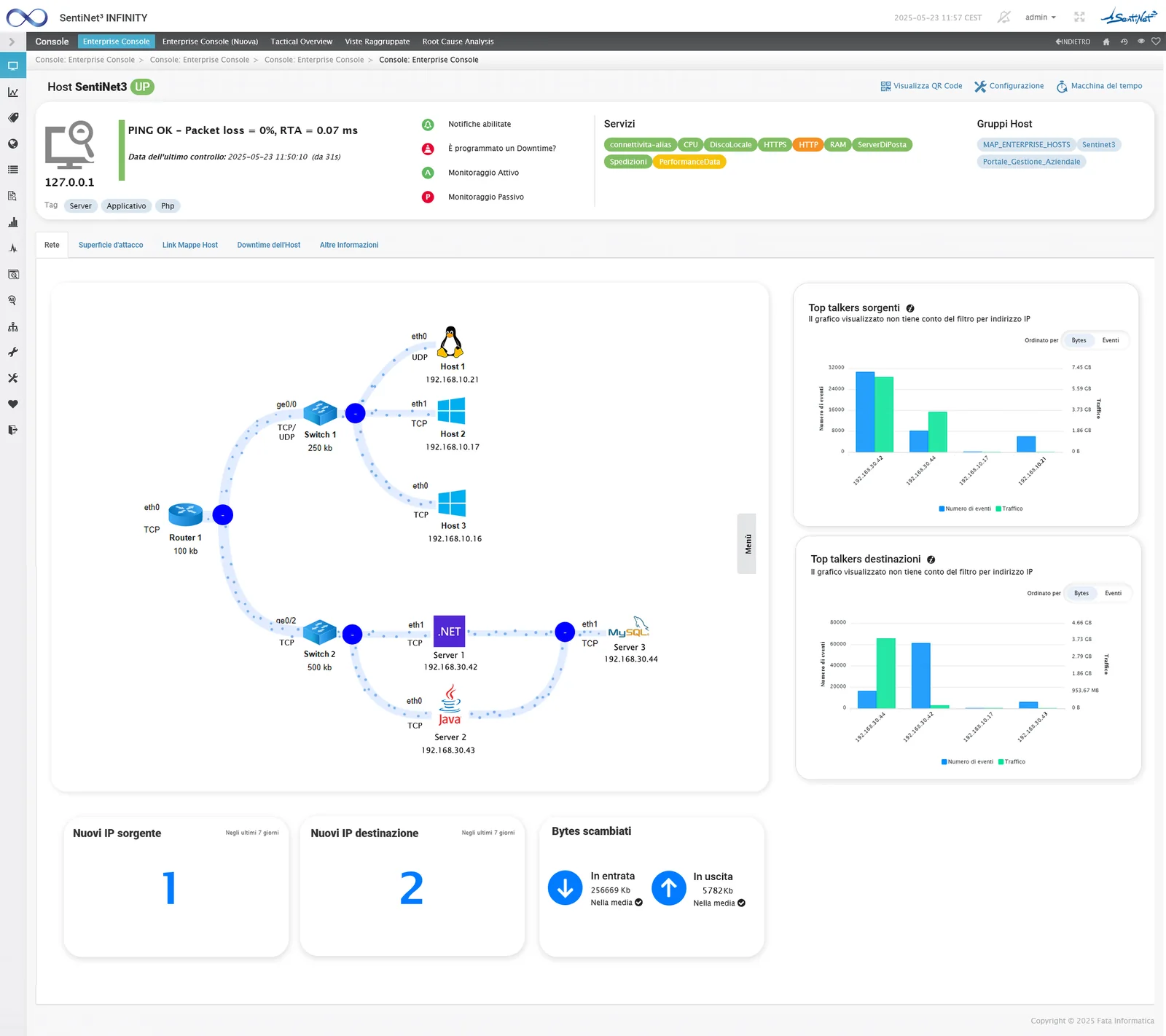
Effective control of hosts
IT infrastructures are becoming ever more complex. Security Insight simplifies the work of SOC teams, speeds up event contextualisation and triage, and helps organisations to:
Suspicious and fileless processes
Identify suspicious applications and processes, including fileless executions (PowerShell and svchost processes).
New software and attack surface
Monitor the installation of new software and changes to the attack surface.
Privileged users
Monitor users with elevated privileges to detect suspicious privilege escalation.
System and network correlated
Correlate system events with network activity to detect advanced attacks.
Configurations and critical files
Check system configurations and critical files to detect suspicious changes.
Periodic collection and change control
The agent periodically collects the security status of the managed hosts. The Security sheet presents the latest sample, highlights items that appeared in the last 30 minutes and allows comparison with previous samples.
| Category | Information available |
|---|---|
| Attack surface | Processes listening on TCP and UDP: port, PID, binding, installation path and command. |
| Connections | Established connections to exposed services, with local and remote IPs and ports. |
| Access | Login and logout history, source host, session duration, connected and privileged users. |
| Processes and software | Running processes, installed software with version, services set to start automatically. |
| History | First and last detection and comparison of information between different dates. |
Attack surface and listening services
The attack surface is presented by protocol, separating TCP and UDP ports. The operator recognises the reachable applications and opens the details of the process exposing each service. Exclusion templates, associated with the agents and configured by operating system, filter out known system processes and reduce noise.
A process listening on 0.0.0.0 indicates binding on all local interfaces; actual reachability also depends on the network context and security rules.
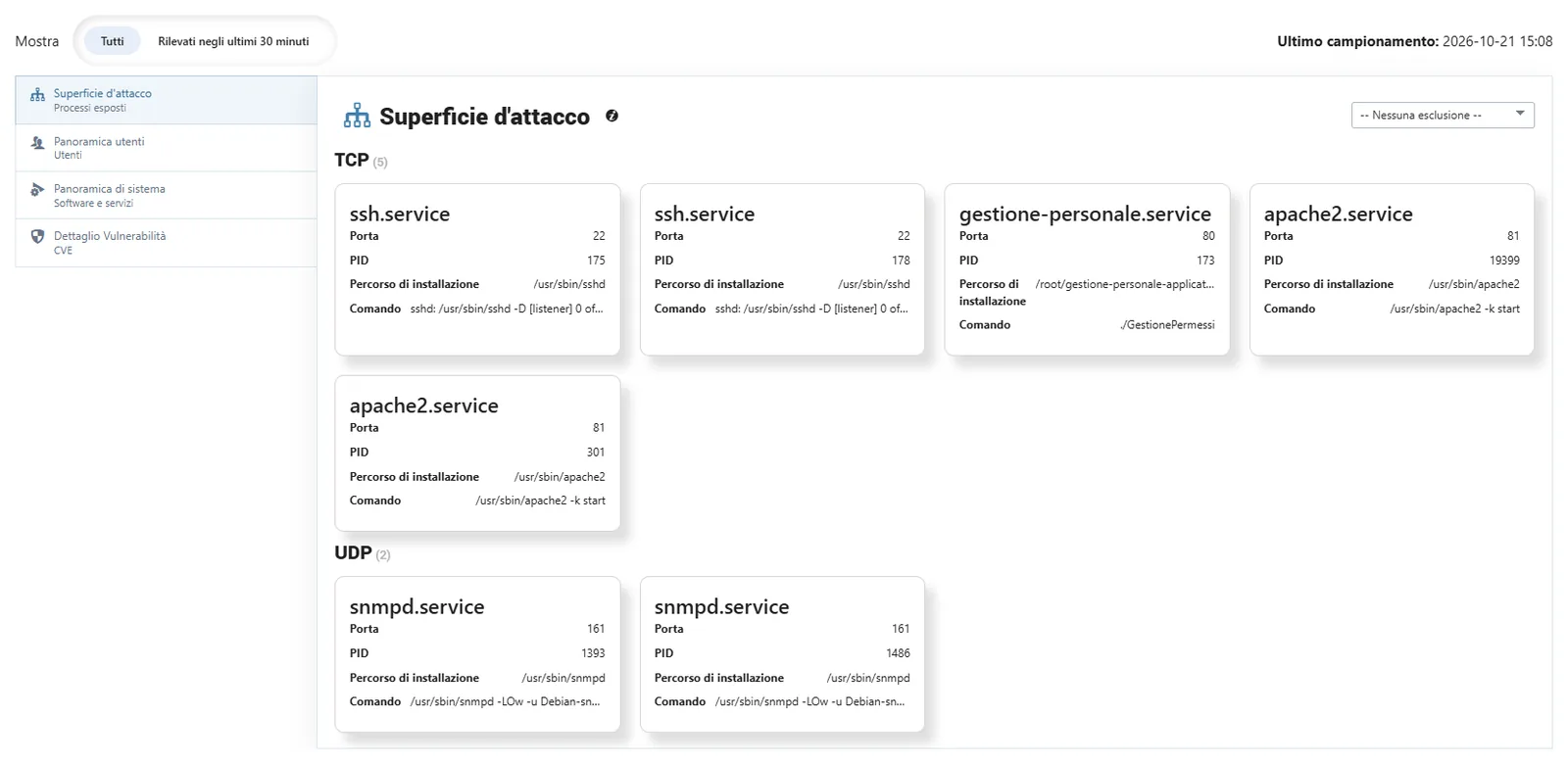
Exposed processes and actual connections
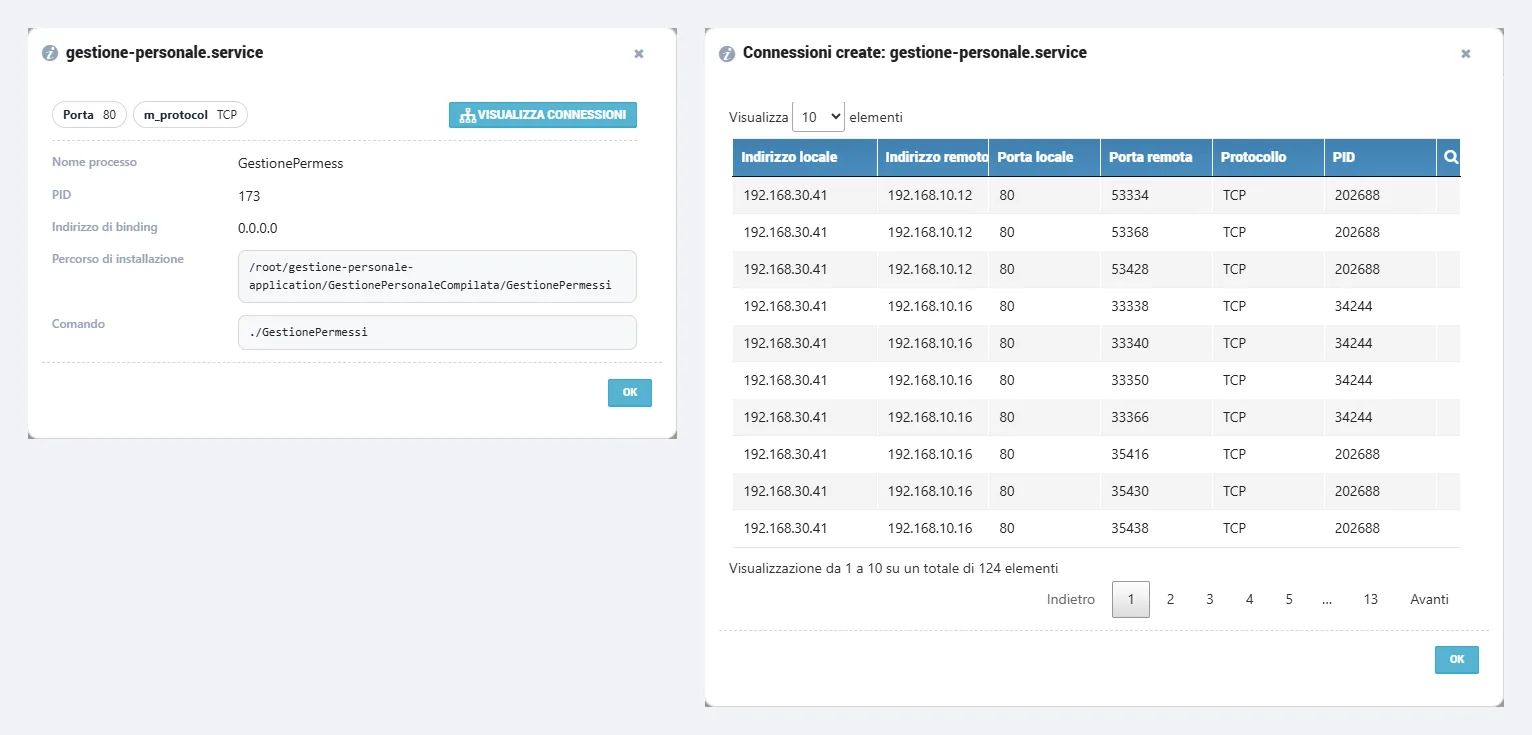
When a service is selected, the details show PID, port, protocol, binding address, installation path and command line. The View connections function lists the actual communications with that process, with source and destination addresses and ports.
This takes you from the list of exposed ports to identifying the clients that are using a service: useful for verifying expected relationships, examining suspicious access or investigating an event that emerged from the maps.
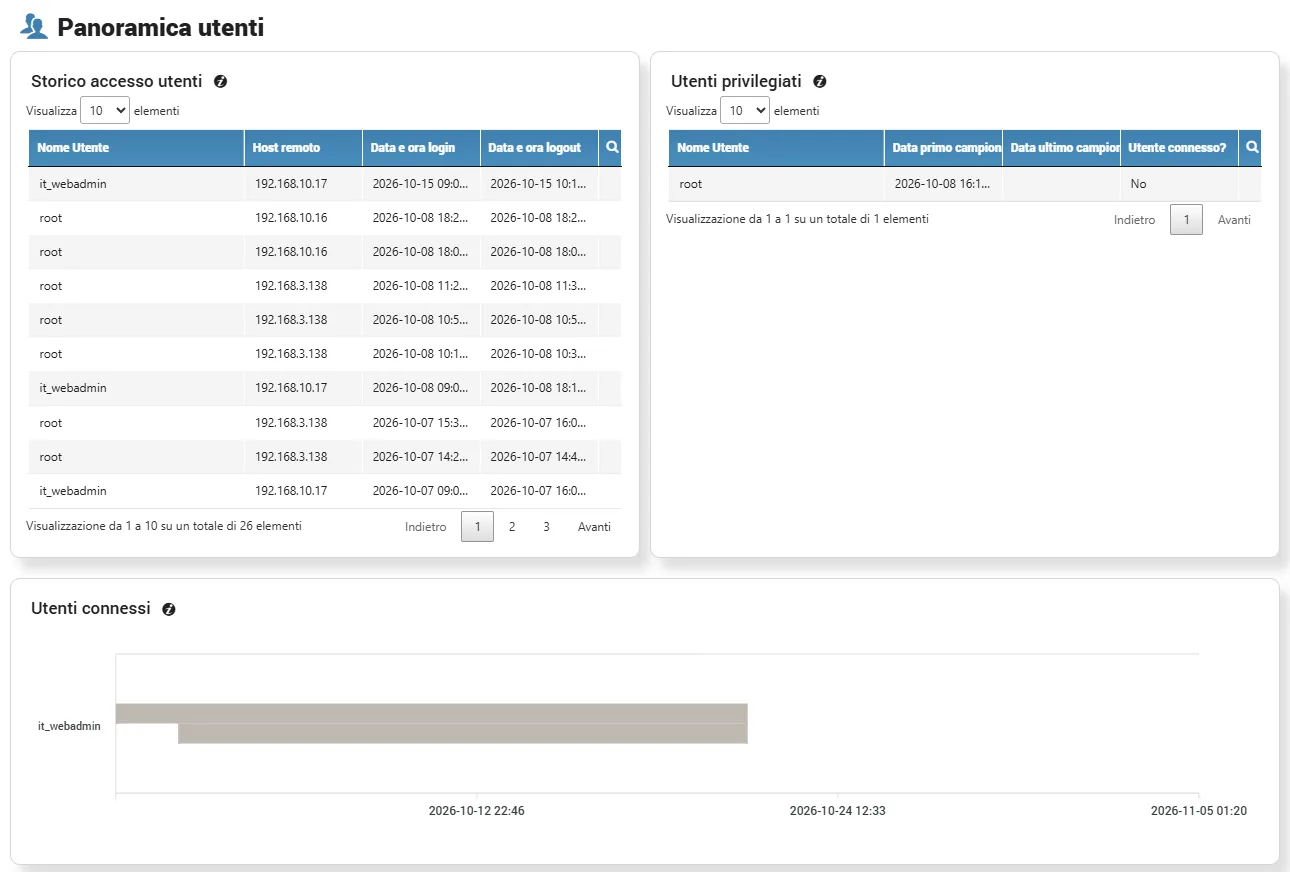
Access, privileged users and sessions
The user overview aggregates access history with username, source host and login and logout times. A separate view lists privileged users, such as administrators and sudoers, and a timeline reconstructs when users were connected.
This makes it possible to verify access and session durations over time, highlighting the identities with elevated powers on the host.
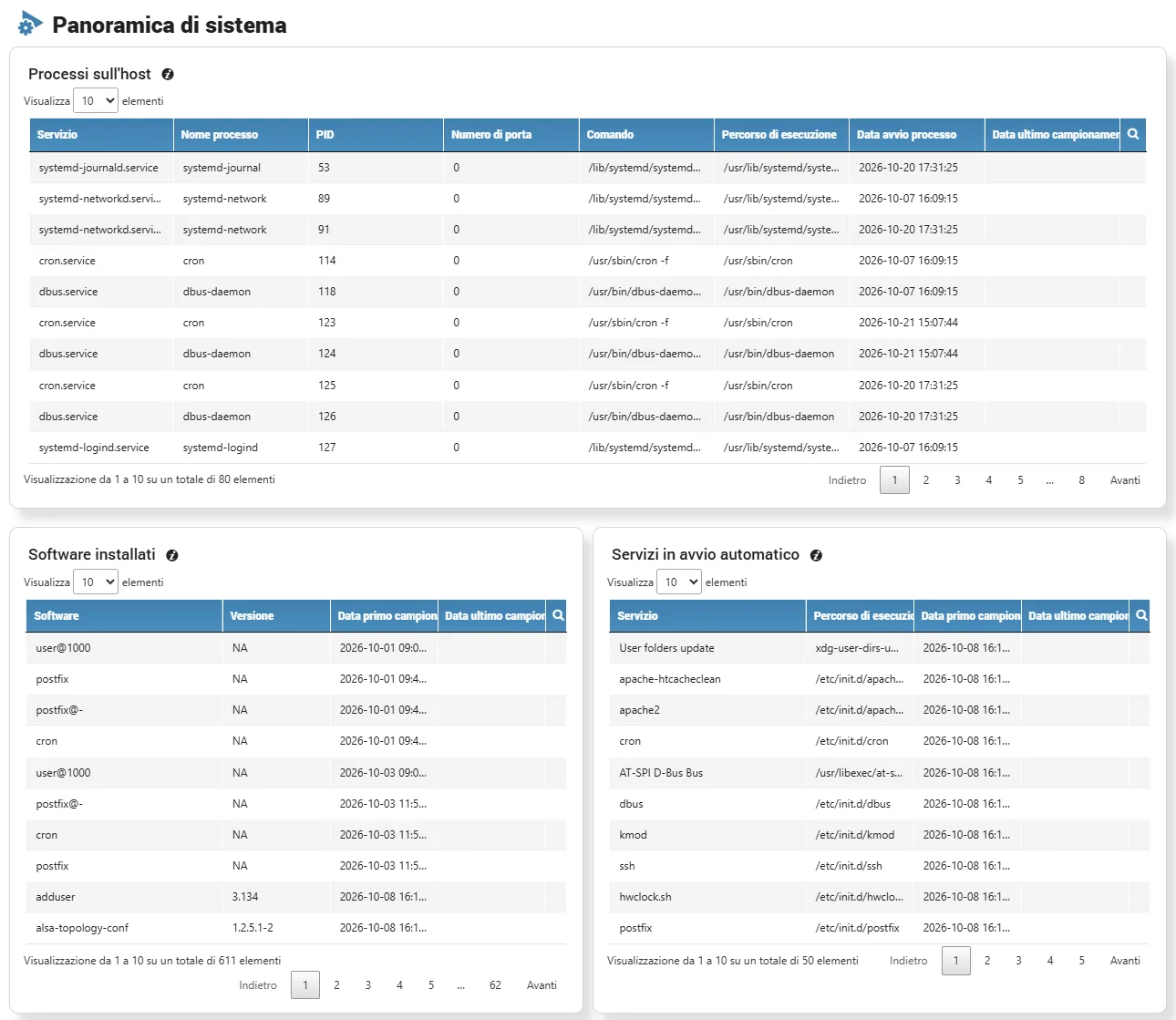
Processes, installed software and automatic services
The system overview brings together active processes, installed applications and software packages with their versions, and the services configured to start automatically. First and last detection are recorded for each entity, to distinguish established components from recent changes.
What has changed on the host
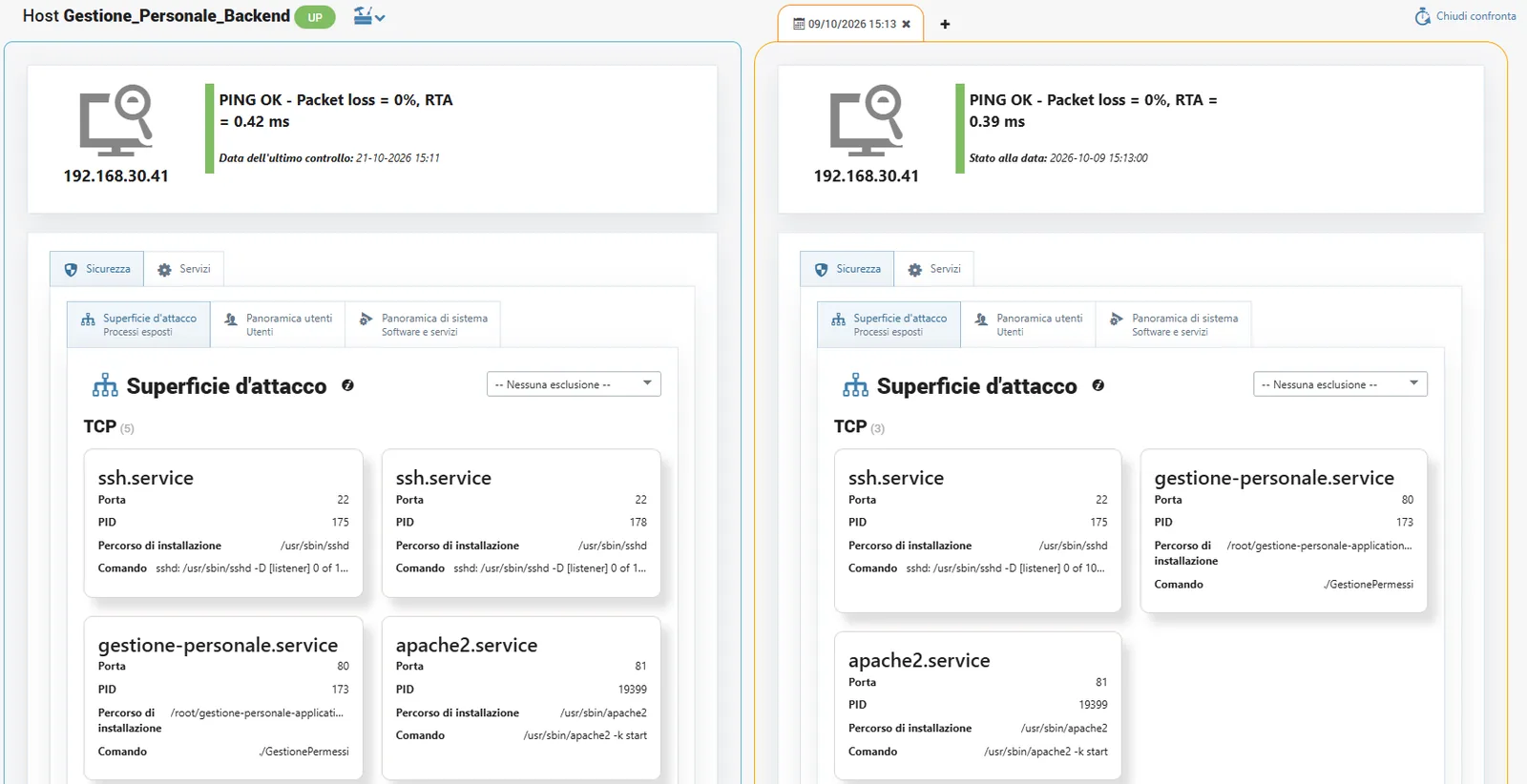
Comparing the current state with an earlier date shows the changes in the attack surface. A side-by-side view reveals services that have appeared or disappeared, changes to installations and changes to the information collected by the agents.
In the example, three TCP services exposed in the past are compared with the five in the most recent state: two new exposures become immediately visible and can be assessed.
Time navigation is provided by the Sentinet³ Core Time Machine and used by Security Insight.
Exposed services, day by day
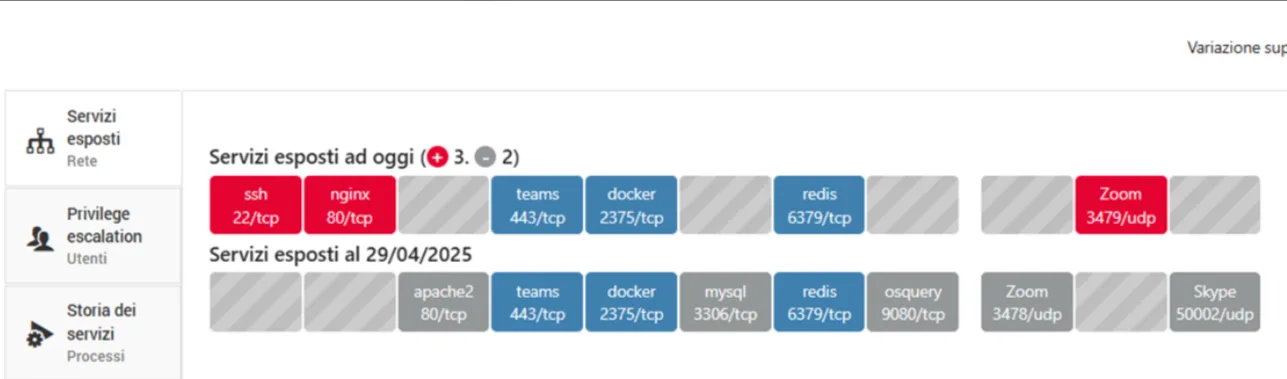
The same logic applies to the list of exposed services: the view places those detected today alongside those from an earlier date, so a new exposure does not go unnoticed.
SIEM alerts on service maps
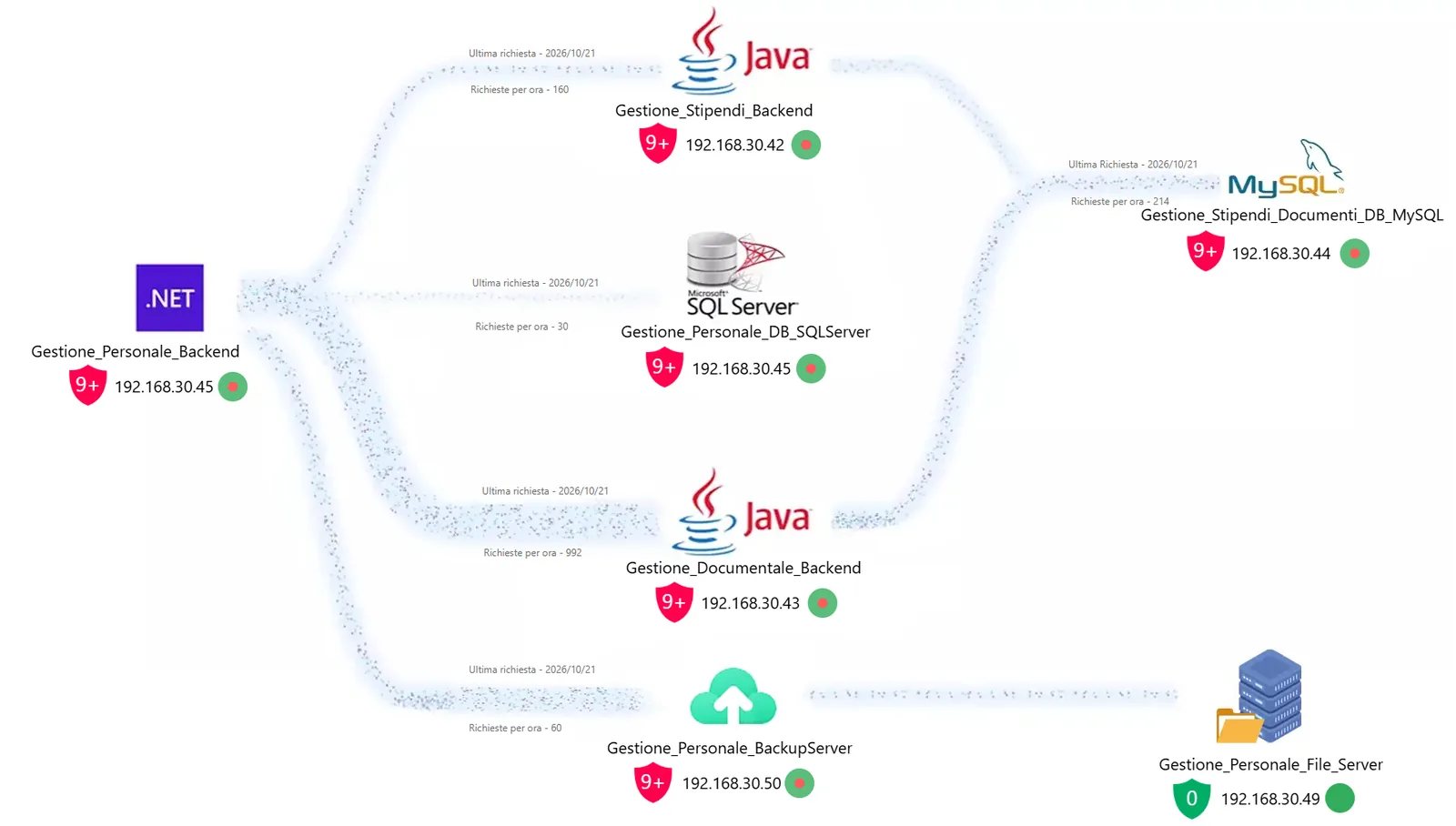
Security Insight retrieves alerts from the integrated SIEMs and associates them with hosts by IP address. On topology and application maps, each host shows a shield indicator with the number of events and a summary severity colour.
The operator immediately sees which components of a service are involved, such as backends, databases and document services, without manually reconstructing the relationship between IP address and business function.
Event analysis and MITRE ATT&CK
A click on the shield opens the event details: alert text, users involved, MITRE ATT&CK techniques, related events, link to the original event in the SIEM, source and destination hosts. From the same view you can open the host’s Security sheet, highlight it on the maps or start adding it to monitoring, if it is not yet inventoried.

A host’s events, over time
The per-host event timeline orders what happens on each machine over time. It helps reconstruct the sequence of an incident and read system events together with network activity.

Event summary, always at hand
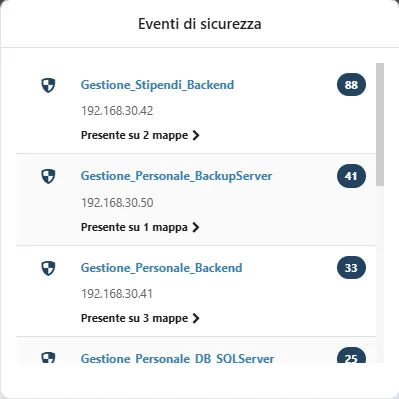
In the top bar of the console, a shield icon brings up the list of hosts affected by security events, with counts and the maps they appear on. Incident navigation remains available even when the operator is not viewing a map.
SIEM console and Sentinet³ contextualisation
Host Security Analysis and SIEM Integration work seamlessly together: from the event to the host, from the host to the exposed processes, connections and users, then to network relationships and application services.
| In the SIEM console alone | With Sentinet³ contextualisation |
|---|---|
| The alert is associated with IPs and messages | The host is recognised within the service and dependency maps. |
| The business impact requires a separate investigation | The potentially affected services and components can be identified immediately. |
| Source and destination must be correlated manually | The relationships between the hosts involved are presented in the event panel. |
| The internal state of the host is not necessarily visible | Processes, connections, users and software can be reached from the Security sheet. |
One piece of the Infinity ecosystem
Security Insight does not replace the SIEM and does not include Vulnerability Assessment. Its information on hosts, access and connections enriches Threat Insight, which handles Continuous VA and attack paths; Network Insight adds the observed flows and Core provides monitoring, topology and Time Machine.
For every SOC level: at the first level, Security Insight quickly tells you whether an event involves strategic assets; at the second and third levels, it accelerates advanced analysis and operational response.
The result is Cybersecurity Situational Awareness: the security status of the different areas of the network perceived clearly and quickly, so you can act in time.
A failed SSH attempt between two backends
An alert appears on the map of the Personnel Management service: a user unsuccessfully attempted an SSH login from Gestione_Personale_Backend to Gestione_Stipendi_Backend. The event panel classifies it with MITRE techniques T1110.001 (password guessing) and T1021.004 (Remote Services: SSH) and shows the two hosts involved. The event can be investigated as a possible indicator of a lateral movement attempt; on its own it does not prove a successful compromise. The analyst continues from the Security sheet: exposed processes, connections and users of the host.
All scenariosRelated topics
Want to see Sentinet³ on your infrastructure?
Tell us about your environment: sites, technologies, critical services. We will show you how Core and Infinity can work on your case.