
Network Insight
Who communicates, with whom, how much, when; and when that communication changes.
From “is it working?” to “who is using the network?”
Network Insight turns the flow exports produced by routers, switches and firewalls into queryable information about the corporate network. Whereas traditional monitoring tells you whether devices are working, this module lets you understand which systems use the network, which counterparts they contact, over which ports and protocols, and how much traffic they generate.
- No agents on servers and workstations
- No inspection of packet content
- NetFlow, sFlow and IPFIX from existing devices
Effective control of network traffic
As IT infrastructures become ever more complex, Network Insight helps organisations to:
Faults resolved sooner
Identify performance issues and reduce fault resolution times.
Optimised bandwidth
Optimise bandwidth usage and manage resources intelligently.
Traffic anomalies
Detect traffic anomalies that could indicate malicious activity.
No bottlenecks
Prevent congestion and bottlenecks, improving operational efficiency.
Capacity planning
Provide detailed data for strategic capacity planning decisions.
Captured flows and collectors
Each record describes a communication: source and destination IP addresses, ports, protocol, byte and packet volumes, timestamp.
| Source | Acquisition | Analysis and use |
|---|---|---|
| Routers, switches, firewalls | NetFlow, sFlow or IPFIX export | Network Insight Collector, delivered as a virtual machine |
| Collector | Flow forwarding and normalisation | Infinity engine for queries and searches |
| Infinity engine | Communication data and time series | Sentinet³ console with views, filters, saved searches and checks, with access profiling |
All your traffic in a single dashboard
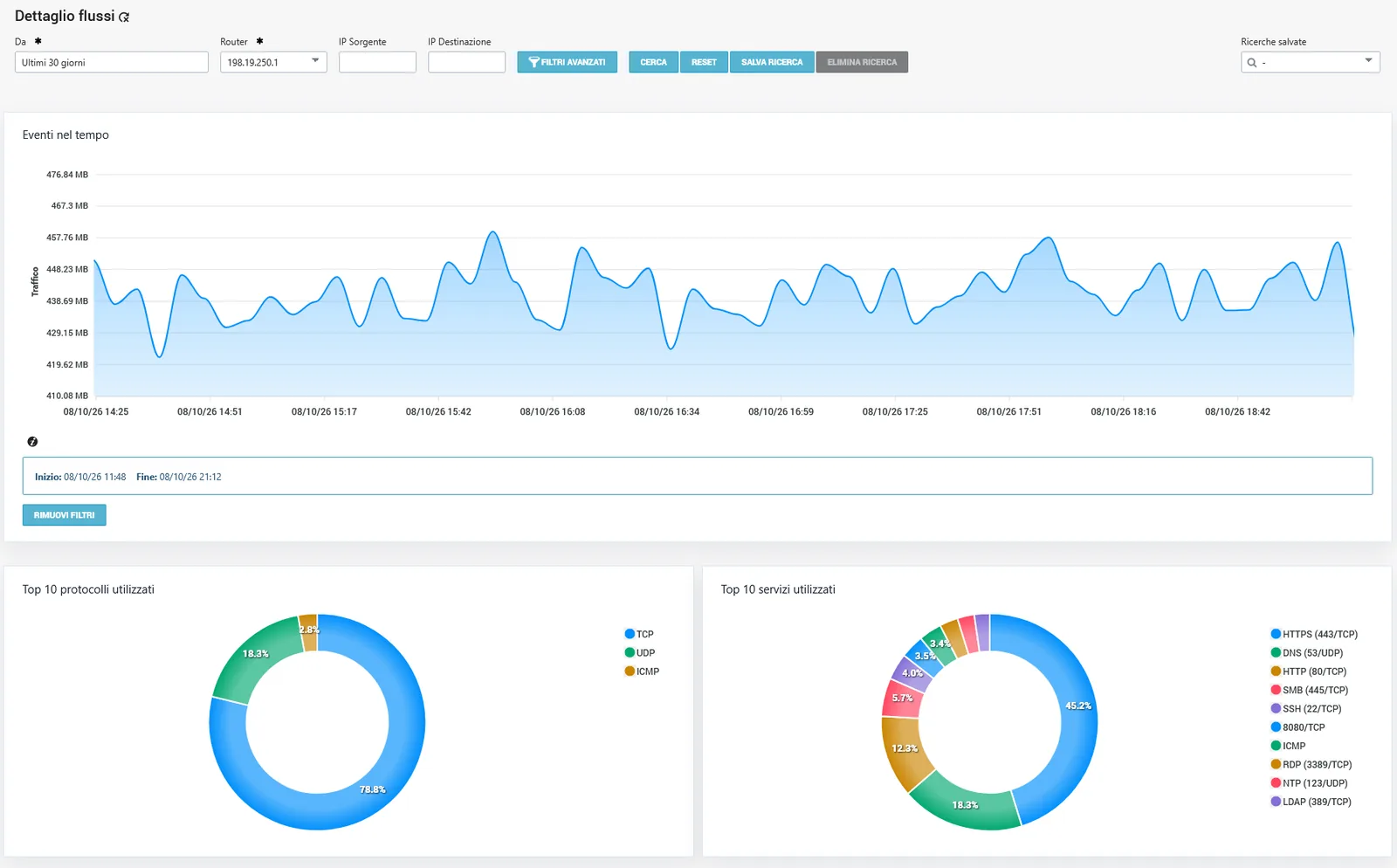
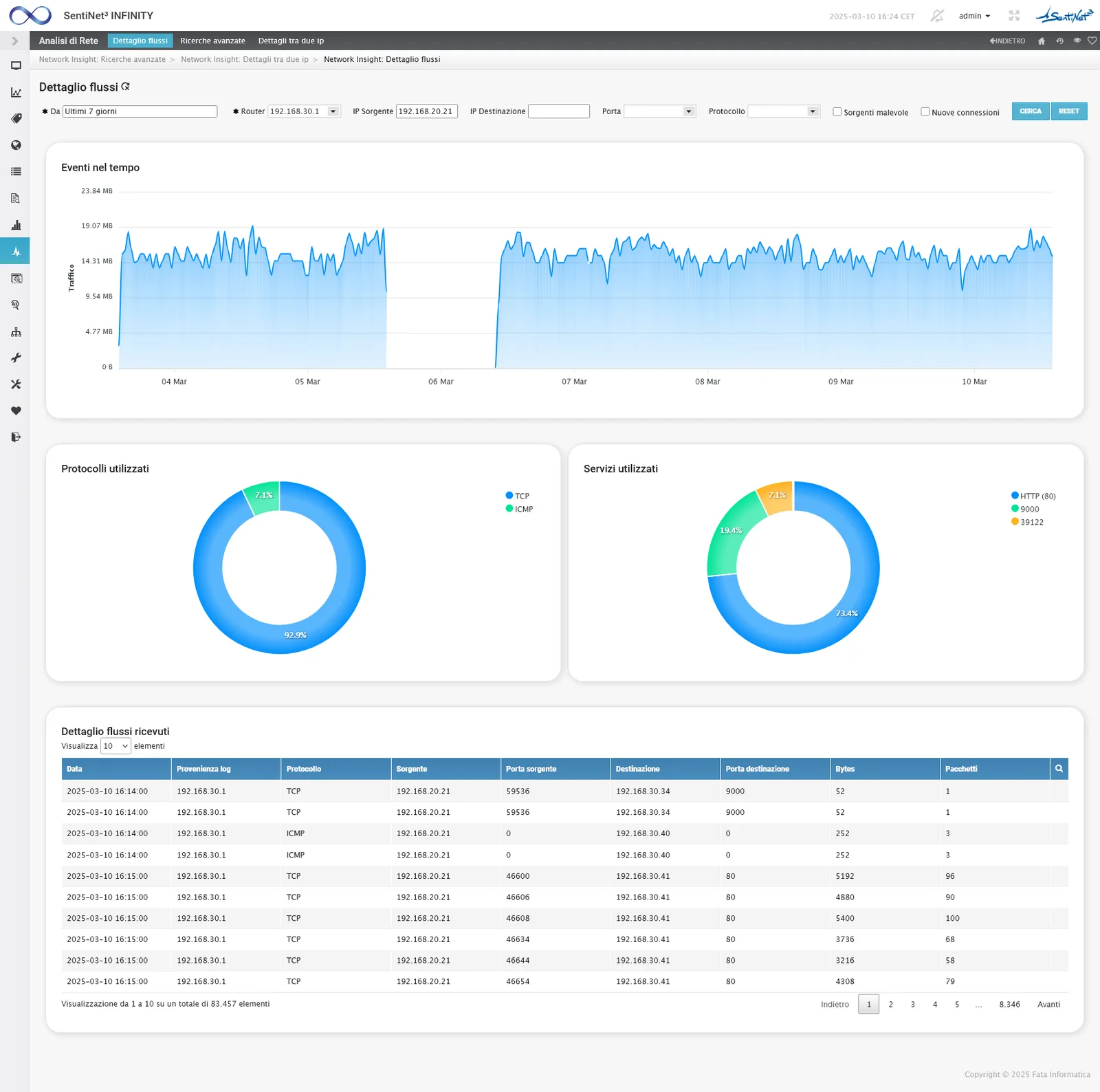
The traffic dashboard brings together time series, doughnut charts on flow composition and the table of detected flows. It is the starting point for understanding how traffic is distributed and where to begin the analysis.
From the overview to the top talkers
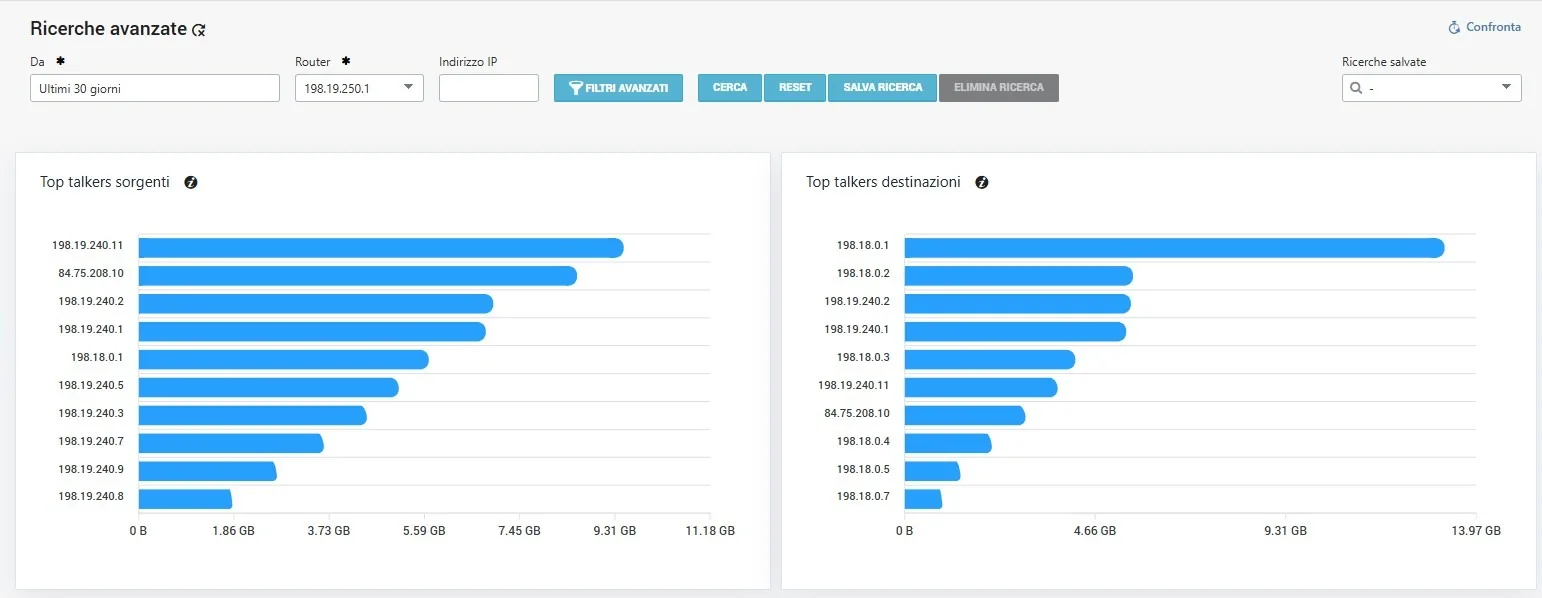
The operator starts from a time period, segment or scope and identifies the largest producers or recipients of traffic, including by number of communications. From the results they select a host, apply consistent filters, drill down into the detail and save searches to repeat.
Events and volumes, host by host
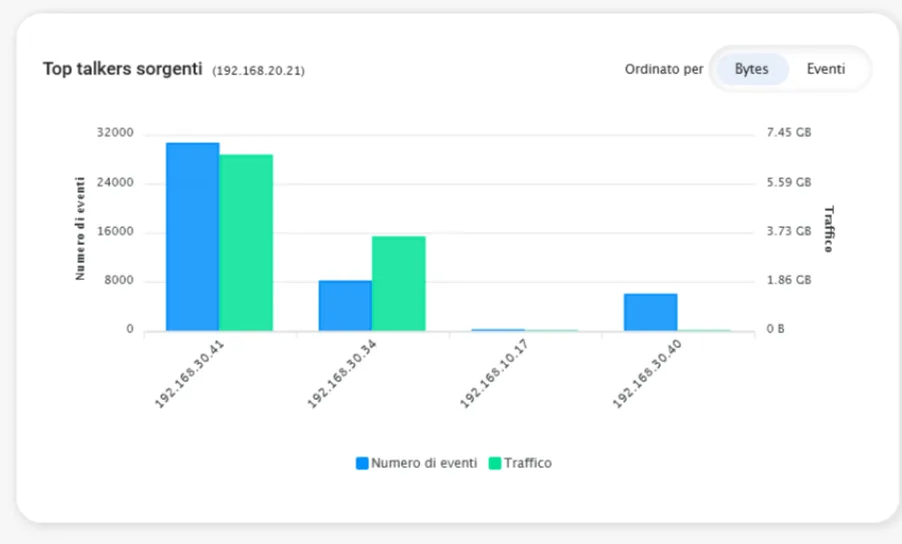
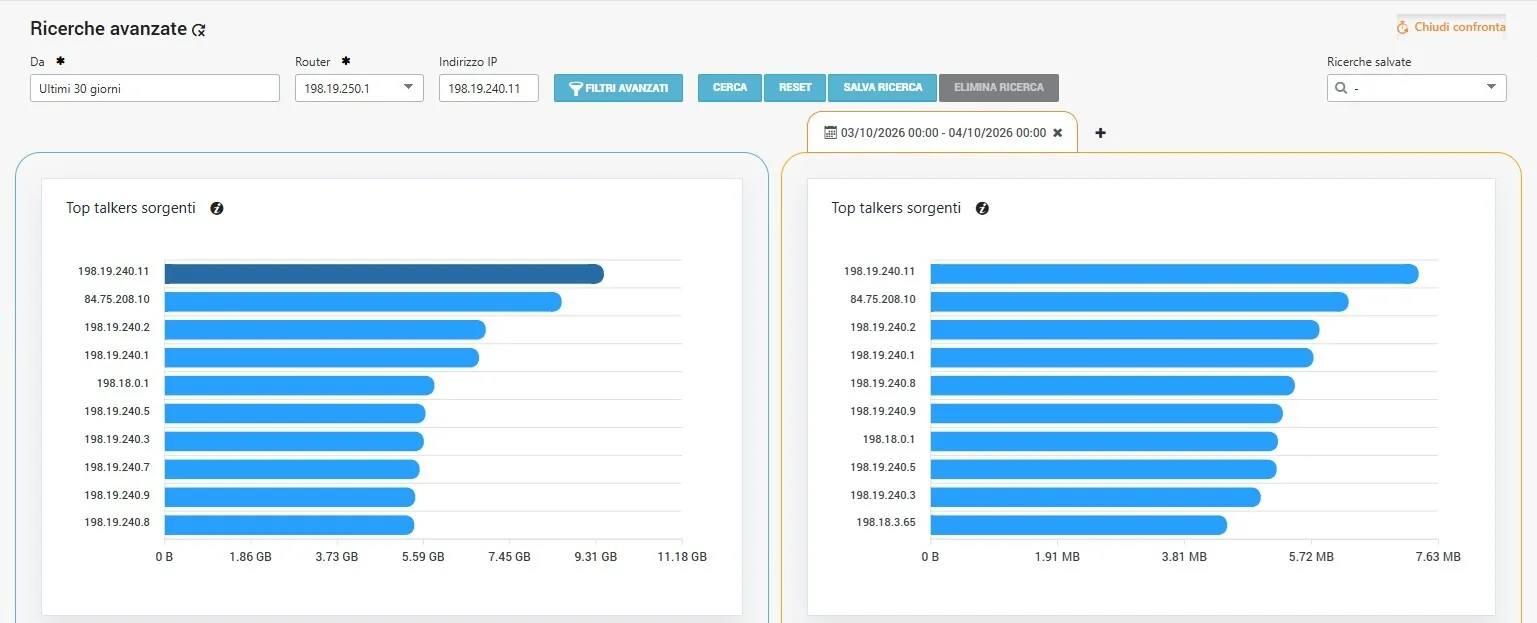
The source top talkers chart shows, for each host, the number of events alongside the traffic generated: you can immediately tell apart those producing many communications from those moving large volumes.
A host’s relationships, conversation by conversation
For a selected host, the system identifies the counterparts, the first and last contact observed, the volumes exchanged and the main protocols and services. You can follow neighbouring nodes and open the conversation between two IP addresses to read its full history.
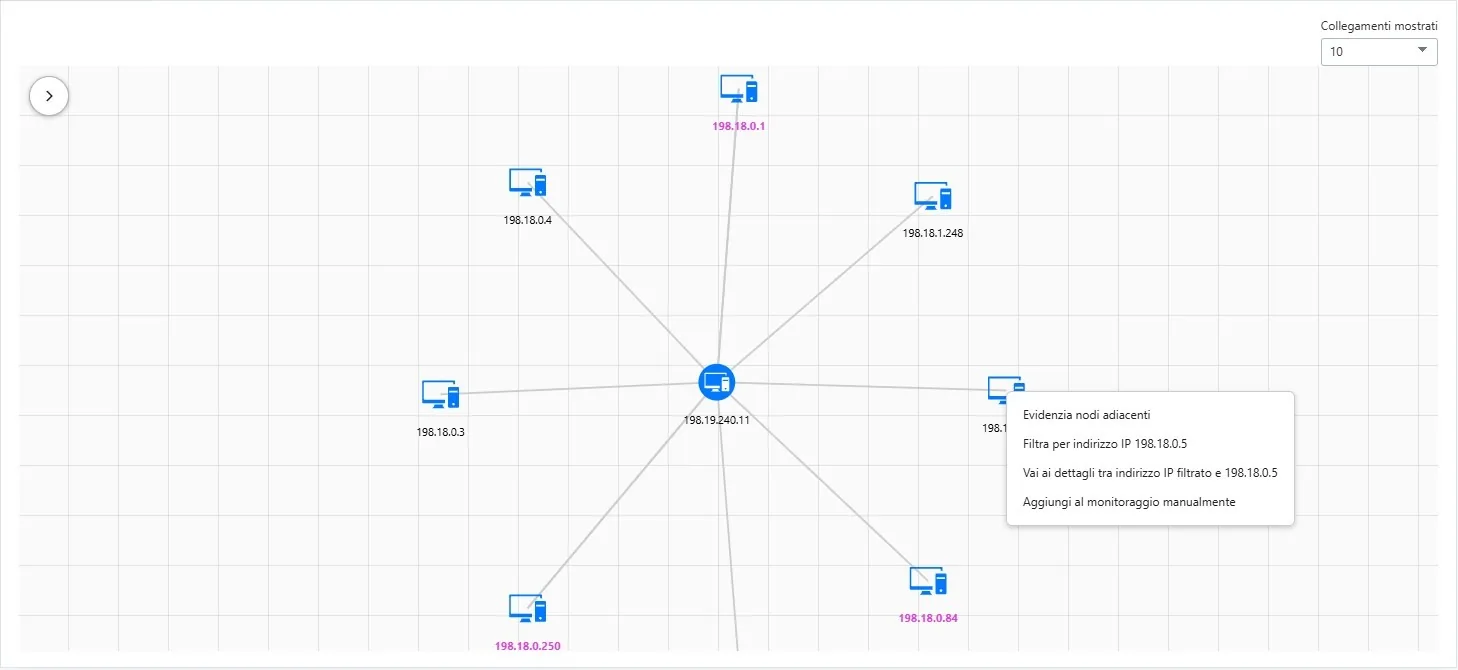
The communication graph
The graph of communications between devices gives you the map of who talks to whom. Expected and unexpected relationships become visible without reading flow tables row by row.
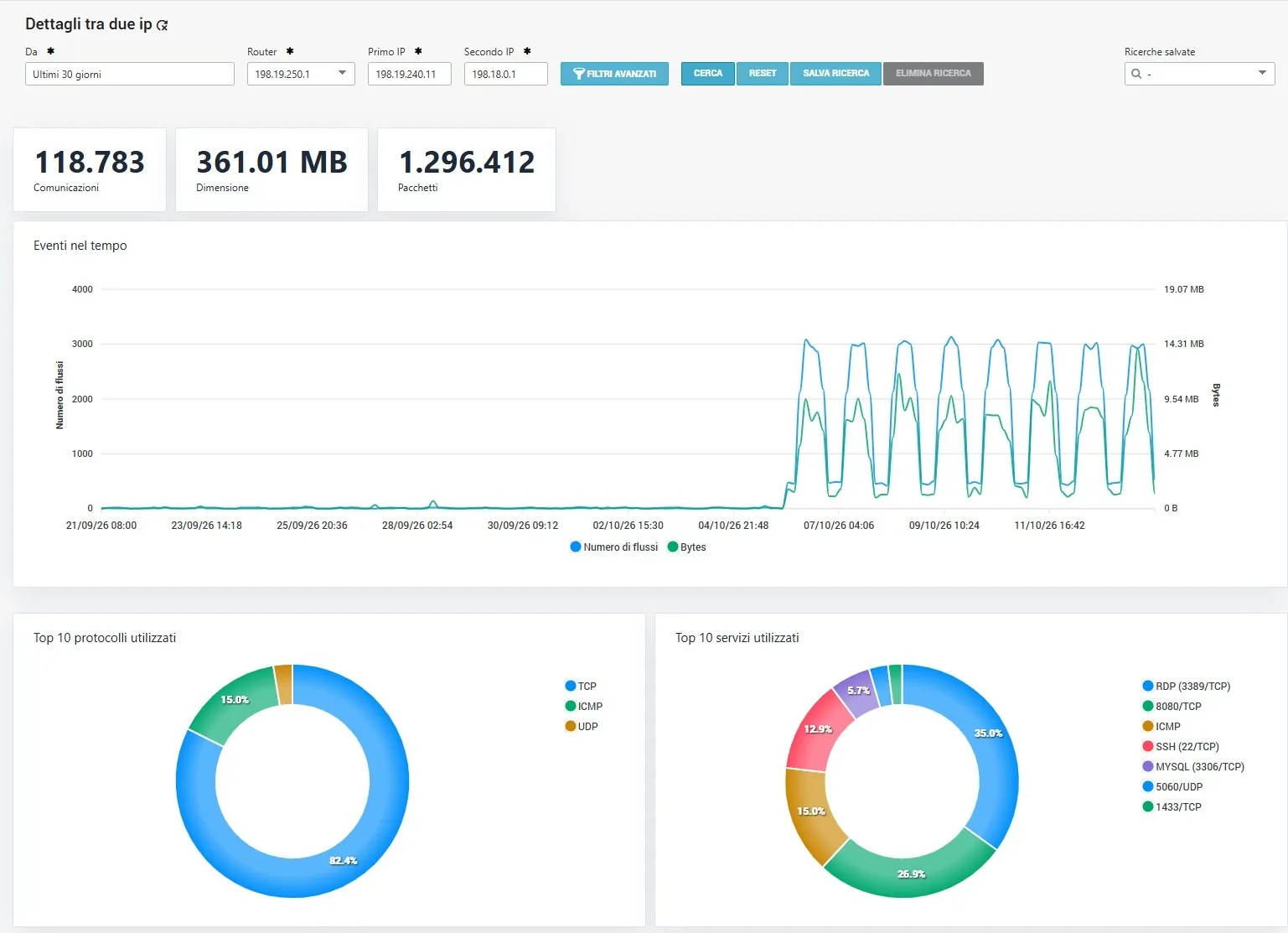
A single conversation between two IP addresses
Once the relationship between two hosts is opened, the view summarises the number of communications, the overall size and the packets exchanged in the chosen period. The time trend of flows and bytes shows how the relationship is distributed over the period; the charts of the most used protocols and services show which ports the two systems use to communicate.
Period comparison and anomaly search
The comparison places different intervals side by side, such as today and yesterday, this week and last week, before and after a change, to highlight variations in the volume and composition of traffic. The analysis can be restricted to communications never observed before and to contacts with IP addresses known to be malicious.
Flow search and time analysis
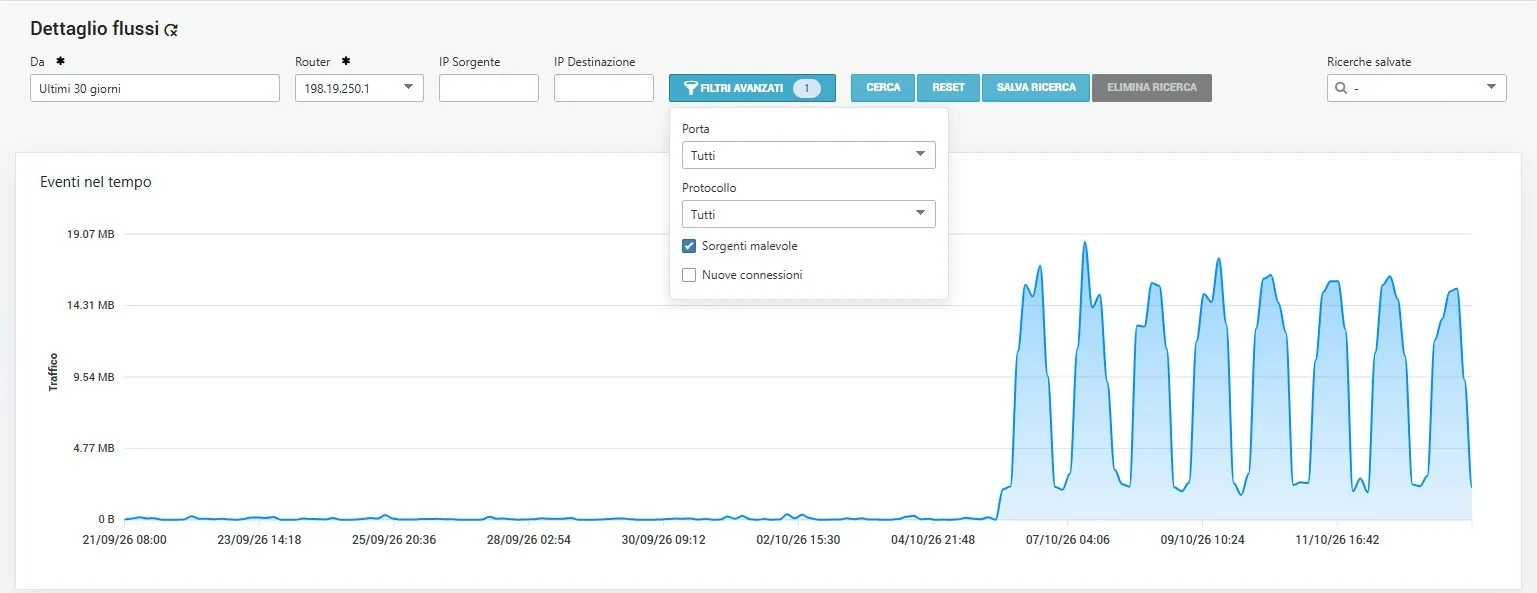
Flow details can be queried by period, collecting router, and source and destination IP. Advanced filters narrow the search by port and protocol and can restrict it to malicious sources or new connections. The events-over-time chart shows when the selected traffic appears and at what rate; the search can be saved and repeated.
From historical data to alerts
Flow queries become periodic checks with warning and critical thresholds, status, history and notifications. The module is not just for after-the-fact investigations: it detects on its own when an expected communication disappears or a new relationship needs to be verified.
| Check | Control logic and expected result |
|---|---|
| Last A–B communication | How long two systems have gone without communicating: useful for backups, replication and application interfaces. |
| New connections | New communications in the interval, across the whole network or on sensitive segments. |
| New connections per host | Watches a single server, OT host or POS and reports new counterparts. |
| Contacts with malicious IPs | Flows to or from addresses classified as malicious. |
| Possible exfiltration | Outbound volumes compared against reference thresholds, to highlight anomalous transfers. |
| Port scans and reconnaissance | Different destinations or ports contacted by a host within a short time. |
| Disallowed services towards the Internet | Ports or protocols not permitted by policy, such as Telnet, SMB or RDP. |
| New top talker | Hosts that suddenly join the largest traffic generators. |
From traffic to monitored assets
An address that emerges from the flows opens directly in the Sentinet³ host sheet. If it is not monitored, it can be added manually or with a wizard: this way, devices and services not yet inventoried enter the scope of control.
Data that feeds every module
Observing real traffic supports troubleshooting, capacity planning, incident analysis, policy verification and control of interactions between critical systems. The same data feeds Threat Insight, which compares possible paths with actually observed communications, and AI Insight, which answers natural language questions about connections.
Example question for AI Insight: “Who did this server communicate with last night?” The local engine queries the Network Insight evidence and presents it to the operator in an understandable form.
When you need Network Insight
Saturated link
Isolation of critical periods, responsible hosts, applications and services, and the volumes generated.
Potentially compromised endpoint
Reconstruction of counterparts, first and last contacts, and new or malicious flows.
Inactive backup or replication
Check on the last expected communication between two hosts, with notification when it stops.
Uninventoried device
Identification in the flows and addition of the host to monitoring.
Capacity planning
Comparison of volumes and services over time to support infrastructure decisions.
Network and policy audits
Communications towards critical systems and checks on disallowed services.
Related topics
Want to see Sentinet³ on your infrastructure?
Tell us about your environment: sites, technologies, critical services. We will show you how Core and Infinity can work on your case.