
Sentinet³ Core
A single platform to know what is working, what is changing and where to act.
From checking a single host to the big picture
Sentinet³ Core is the operational heart of the Sentinet³ platform. It continuously checks the availability and performance of systems, network devices, software services and technology infrastructures, turning a multitude of individual checks into a coherent, navigable picture.
A host that is up does not guarantee that its services are usable. The Core assigns specialised checks to the monitored nodes, each with its own frequency, parameters, thresholds, state and history, and applies the same model to physical structures (a data center, a remote site, a UPS) and to logical ones, such as services and software components.
Operating principles
- Unified monitoring from a web console, with navigation down to the individual host or service.
- Early detection of critical conditions through configurable checks and thresholds.
- Heterogeneous infrastructures supported through standard protocols, agents, scripts and plug-ins.
- Visual representation of states with maps, charts and availability indicators.
- Timeline reconstruction of events, automatic interventions and escalation procedures.
The result is less time to identify and diagnose a problem, and a shift from purely reactive management to continuous, measurable surveillance. How it works
Check, Alert, Act, Analyse
The Core works in a continuous cycle: it verifies the state of every component, alerts whoever has to intervene, runs the planned corrective actions and analyses events and history.
Check
Continuous checks with frequency, thresholds, state and history on hosts, devices, applications and sensors.
Alert
Notifications by email, SMS and voice, on-call groups, escalation and anti-flooding.
Act
Preconfigured commands and sequences when specific conditions occur.
Analyse
Event correlation and Root Cause Analysis, Time Machine, Situation Analysis and SLA reports.
IT monitoring
Systems, network and applications in the same console and the same state model.
Datacenter monitoring
Environmental monitoring of the data center geared towards Disaster Prevention.
OT monitoring
Monitoring of industrial plants and systems, compatible with Modbus, Fieldbus, OPC and SCADA.
What the Core monitors
Systems, network, applications and the physical data center environment in the same state model, with thresholds, history and notifications.
Infrastructure and systems
Windows, Linux and Unix: CPU, memory, disks, processes and services. Hardware, RAID, SMART and storage; VMware ESX, Hyper-V, Xen and KVM; Active Directory, DNS, DHCP, SMTP, RADIUS and NTP.
Learn moreNetwork
Routers, switches and firewalls: reachability, ports, interface utilisation, bandwidth, latency and errors. Interface Inspector, SNMP polling and traps, TCP and UDP ports, links between sites.
Learn moreApplications and services
Tomcat, WebSphere, WebLogic and JBoss; Exchange, SharePoint and IIS; Oracle, SQL Server, MySQL, DB2 and PostgreSQL. HTTP checks and web transactions linked to system resources.
Learn moreEnvironment and data center
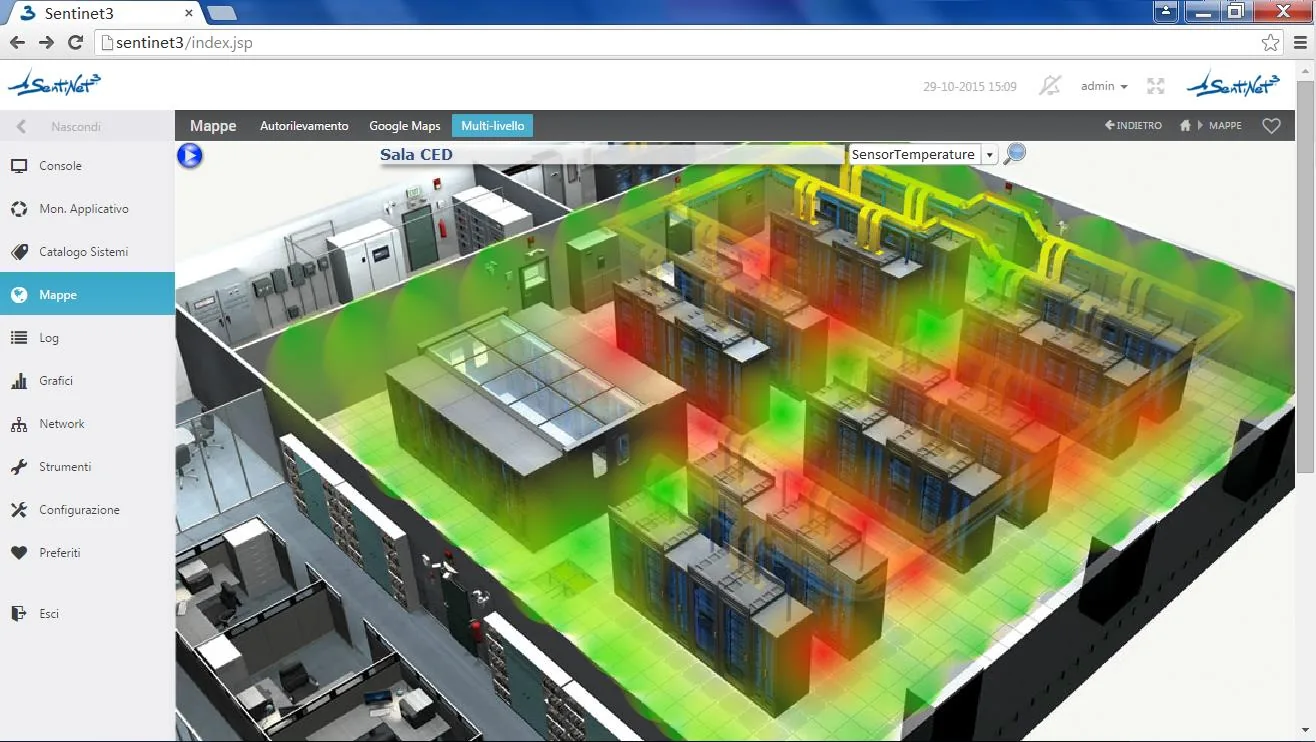
Sensor Probes in technical rooms and rack aisles: temperature and humidity, power and UPS, smoke and flooding, door contacts and video surveillance, with integrated corrective actions.
Learn moreConsole and maps
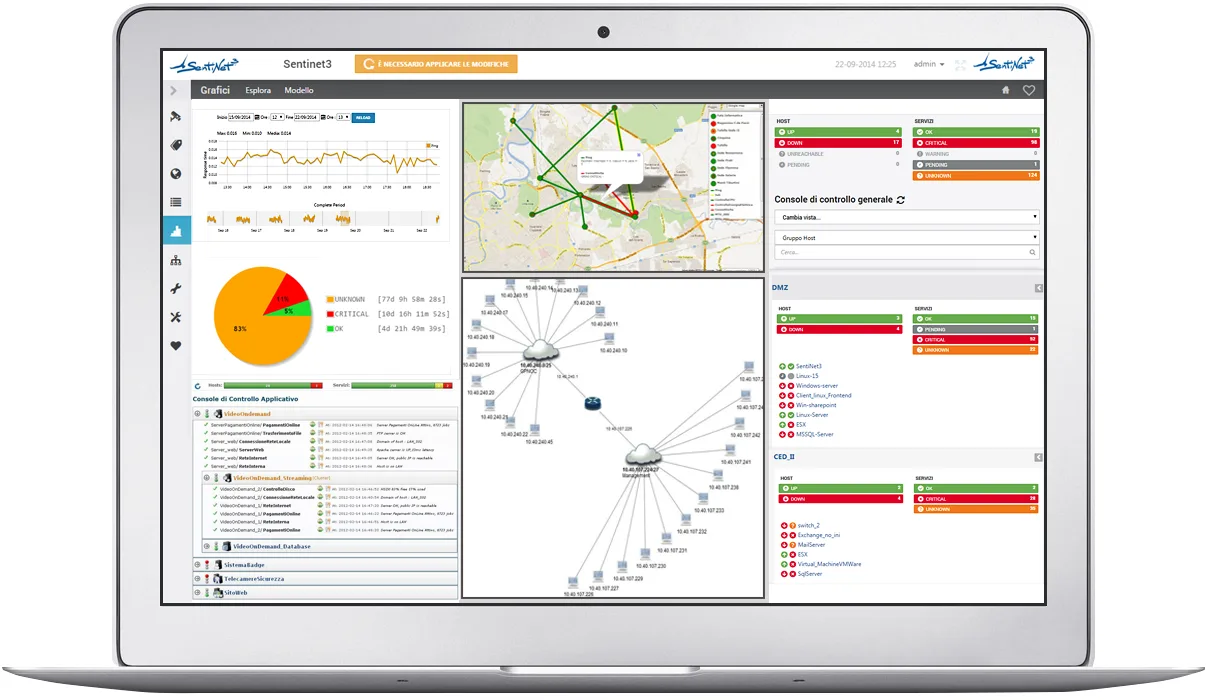
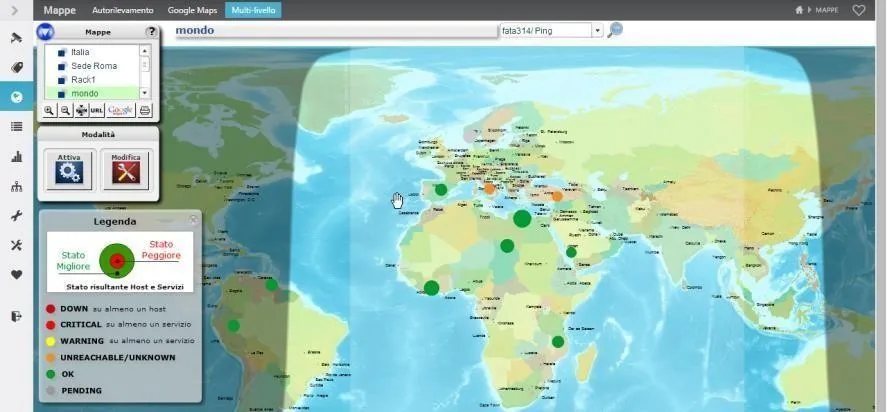
The state of systems in the foreground, from summary views to detailed maps: from the geographic distribution of sites, with successive drill-downs, down to the data center, the rack and the individual component.
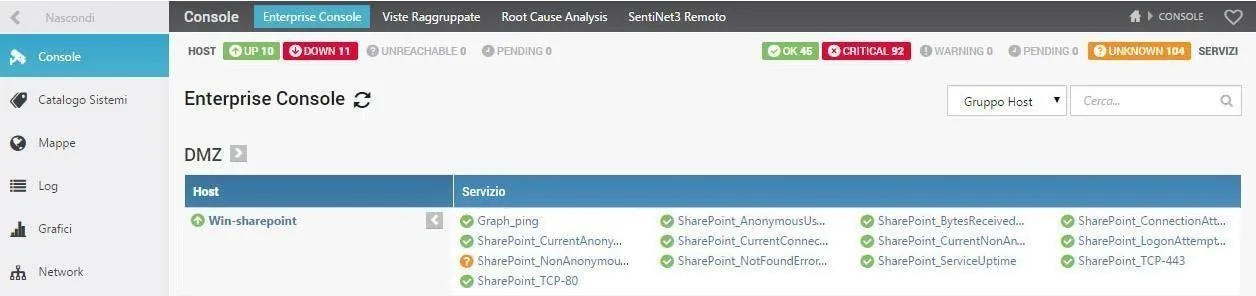
- Enterprise Console with host and service states, operational categories, filters and groupings.
- Tactical Overview: a custom page with the priority checks and reports.
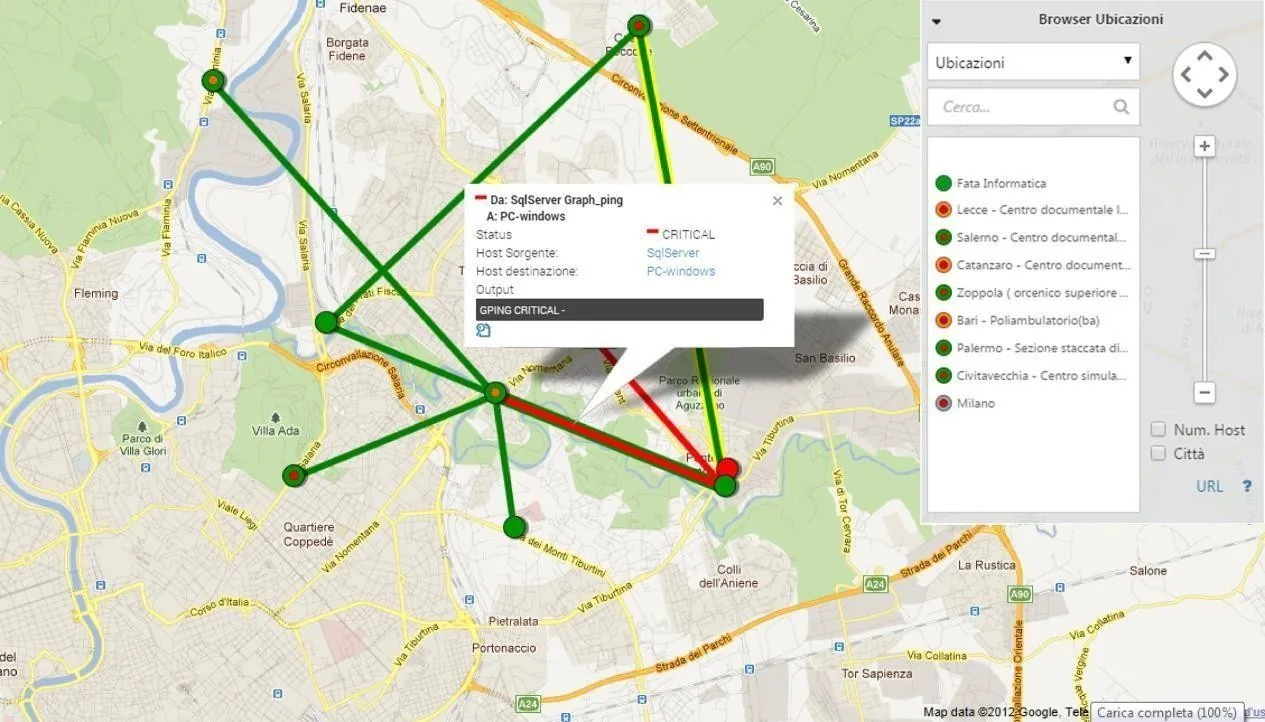
- Multi-level, georeferenced maps with visual indicators of host state.
- Link services that summarise the state of the connection between two points on the map.
- Responsive web interface, accessible from desktop, smartphone and tablet.
Key features
Enterprise Console
- Host and service states in summary form.
- Distinct operational categories, filters and groupings.
- Navigation down to the individual host or service.
Tactical Overview
- A page built by the operator.
- The checks and reports considered a priority.
- The most relevant systems always under observation.
Multi-level and georeferenced maps
- From the geographic distribution of sites to the data center and racks.
- Host state shown with visual indicators.
- Geographic links expressed as link services.
Desktop and mobile access
- Console, states and monitoring information from smartphone and tablet.
- On-call staff check the alarm and its context away from the operations room.
- Access governed by the roles and credentials of the installation.
Time Machine
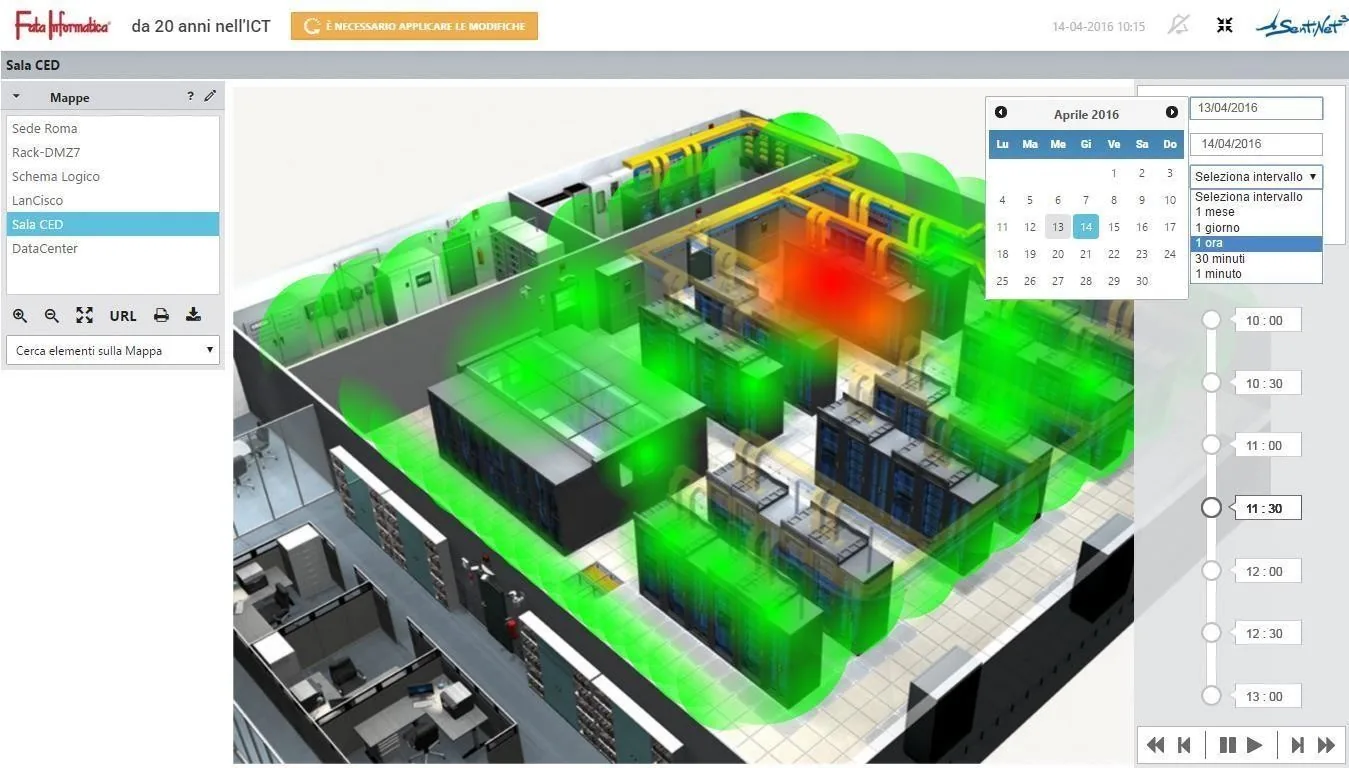
Go back to a past moment to understand the fault in the context in which it occurred. Time Machine takes the console and maps back to the date and time of interest, reconstructing in a synchronised way the states of systems and services observed at that moment.
- Start from the moment of the outage indicated by the notification or the log.
- See together the hosts and services that were critical.
- Follow maps and relationships to find the area of greatest impact.
- Compare states before and after the anomaly to reconstruct how it evolved and was resolved.
- Ideal when the incident occurred during an unattended period.
Key features
Synchronised reconstruction
- Console and maps taken back to the date and time of interest.
- States of systems and services reconstructed at the same moment.
Focused troubleshooting
- A contextual view of the past instead of many logs consulted separately.
- It does not replace log analysis, but steers it towards the relevant components and intervals.
Point-in-time state and trends
- Time Machine shows what the infrastructure looked like at a specific moment.
- Situation Analysis measures trends and distributions over selected periods.
Across the Infinity modules
- History of asset state, agent information and contextualised alarms.
- Security Insight uses its time-based views to compare the security state of hosts.
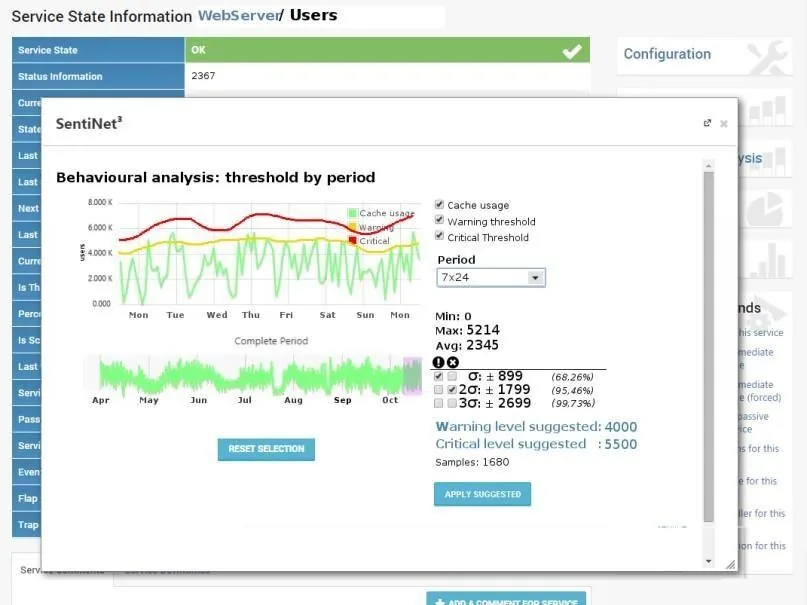
Behavioural Learning Engine and event correlation (Root Cause Analysis)
Reading how metrics behave, proposing better-fitting thresholds and tracing a service outage back to its cause: two complementary functions to configure more useful checks and focus troubleshooting on the systems responsible.
- Behavioural Learning Engine: Behavioral Thresholding, Dependency Model detection and Trend Prediction.
- Recurring conditions distinguished from anomalies, and configurations that no longer fit highlighted.
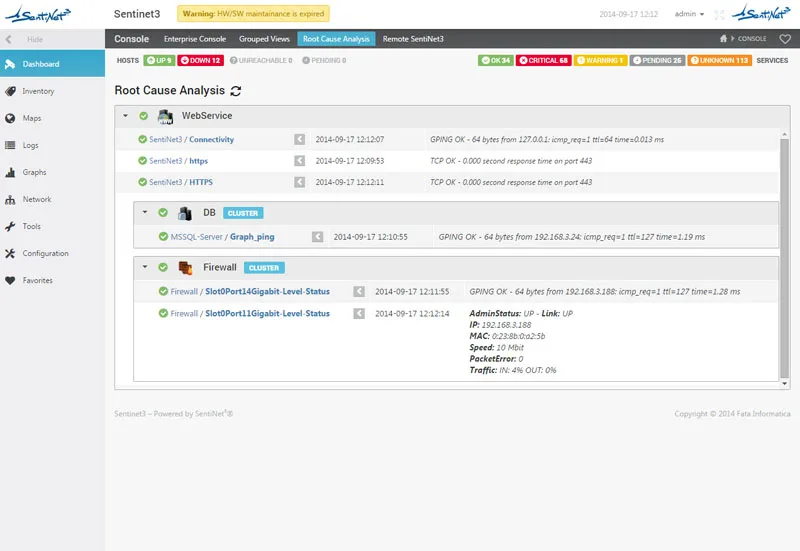
- Event correlation with rules based on the AND and OR operators: several correlated events generate proactive alerts and events.
- Correlation identifies the root cause, which can be viewed in the Root Cause Analysis console.
- Hierarchical view to separate symptoms from the origin of the outage.
Situation Analysis
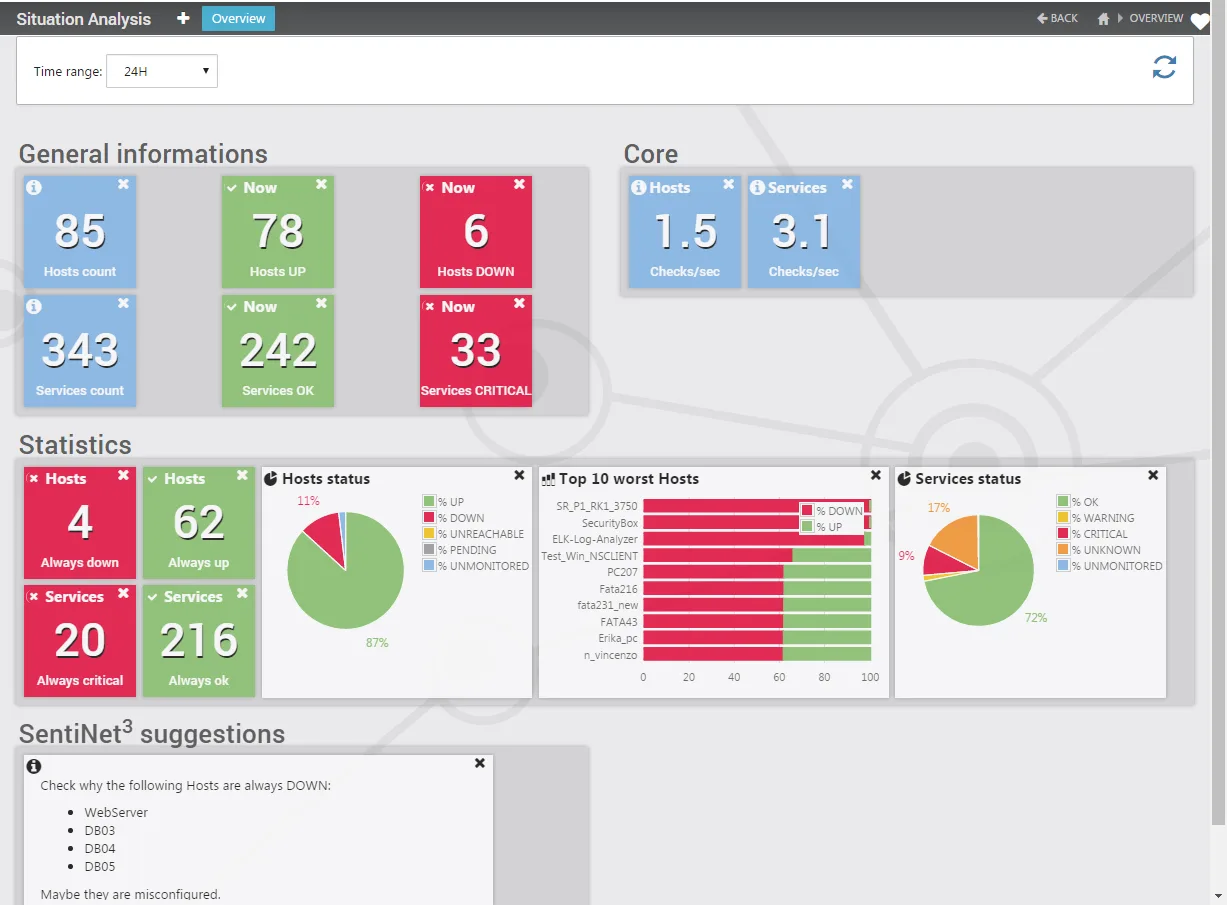
A statistical view of the infrastructure: what is happening now, what persists and what is getting worse. A specialised dashboard, with widgets that the operator selects, arranges and removes, and drill-down to the operational views.
- Three perspectives: general, by host and service groups, historical.
- KPIs on host states (UP, DOWN, UNREACHABLE) and service states (OK, WARNING, CRITICAL, UNKNOWN).
- Absolute quantities, percentages and durations.
- Top 10 worst-performing systems and persistent issues.
- Comparisons with the previous day and different observation windows.
SLA and reports
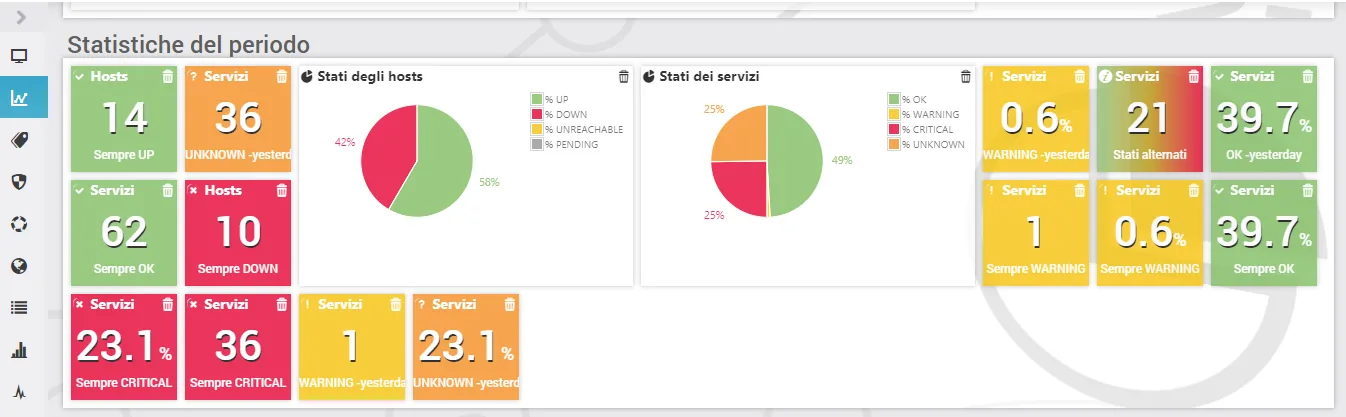
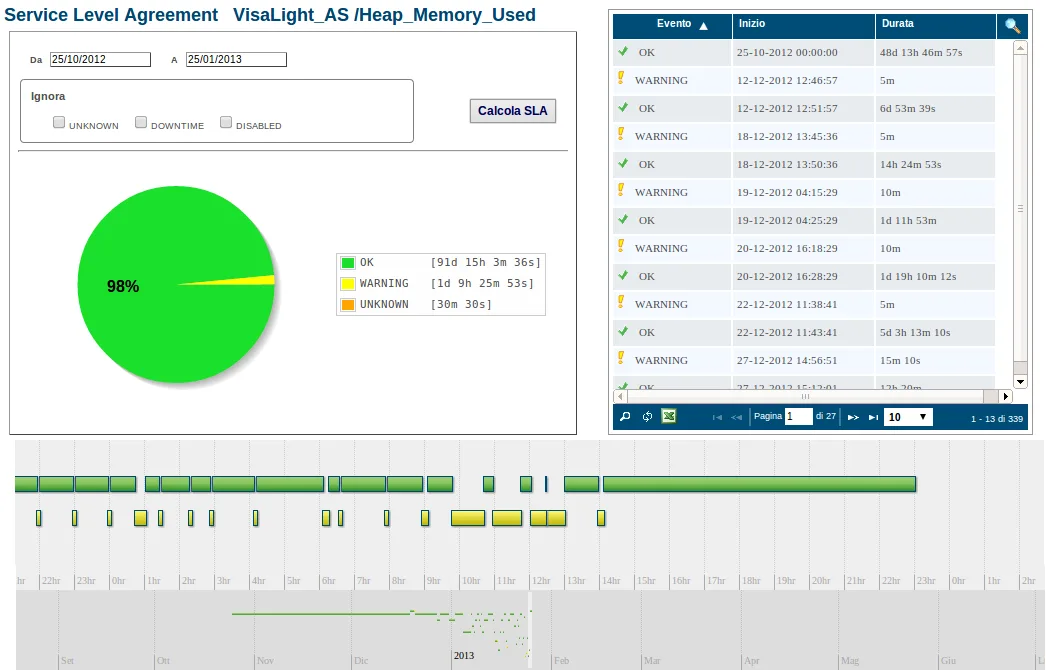
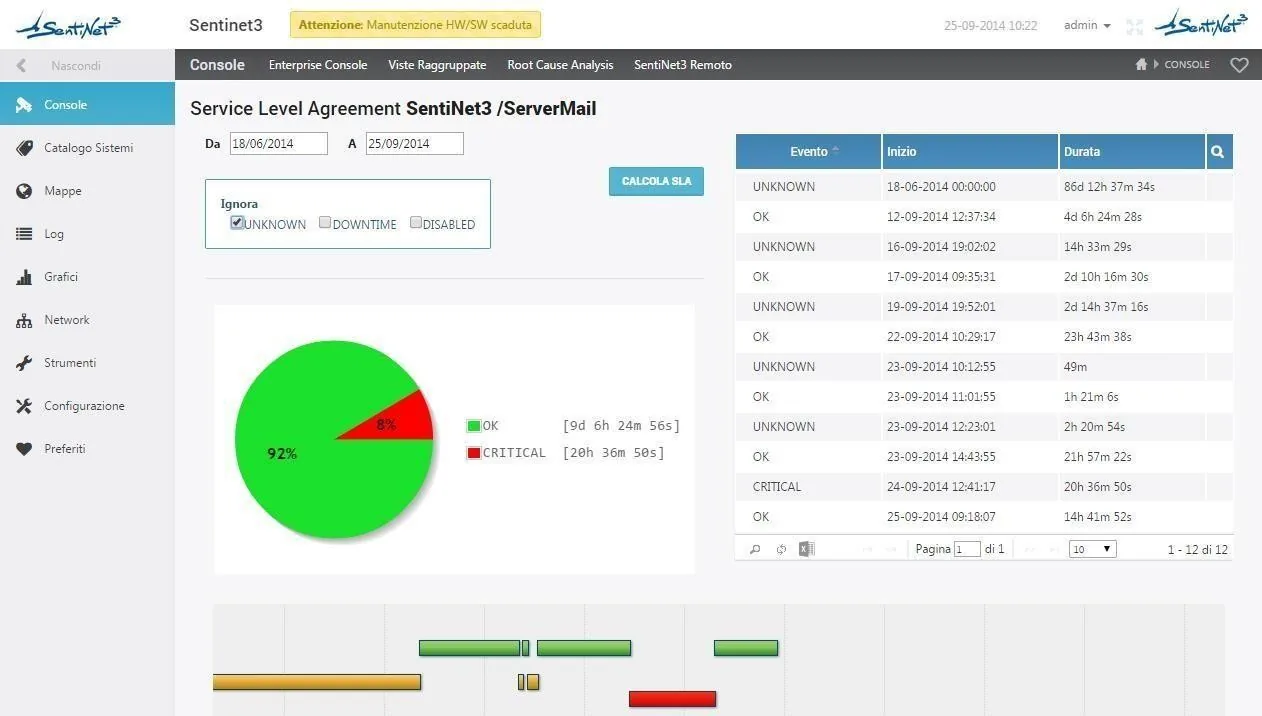
Measuring service continuity and making uptime and downtime verifiable. For each check the Core calculates the percentage distribution of states over the selected period.
- Percentages linked to a verifiable timeline: every state change with date, time and duration.
- From the aggregate result to the intervals in which the outage occurred.
- Planned maintenance windows handled without altering the availability measurements.
- Time charts, state change tables and data export.
Alerts, escalation and automation
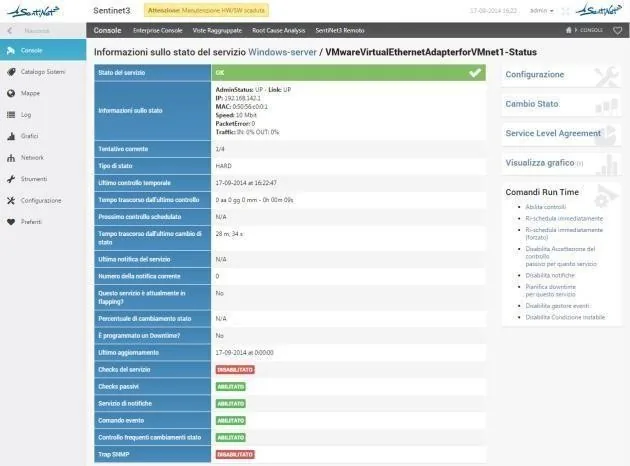
Events become timely communications, defined responsibilities and possible corrective actions. When a metric exceeds a threshold or a service changes state, the Core notifies the people responsible with the technical context needed for diagnosis.
- Notifications by email, SMS and voice; for environmental scenarios also SNMP traps, HTTP posts and mobile devices.
- On-call groups and hierarchies with escalation to the next level.
- Anti-flooding: a limit on notifications per event, with the excess sent in aggregate form.
- Preconfigured commands and sequences when specific conditions occur.
- Traceability of state changes, notifications, traps, logins and system logs.
Key features
Targeted notifications
- Email, SMS and voice.
- SNMP traps, HTTP posts and notifications to mobile devices for environmental scenarios.
- Channel chosen according to the event type and the configuration.
Escalation and on-call
- Contacts organised into groups and hierarchies.
- If the issue persists, the alert moves to the next level.
- No dependence on a single operator.
Anti-flooding
- Maximum number of notifications per event within a time window.
- Excess events queued and sent in aggregate form.
- Information content preserved during widespread failures.
Proactive automation
- Restarting a service or running a maintenance script.
- Activating a mitigation device.
- Authorised actions, designed with reversibility and dependencies in mind.
Discovery and topology
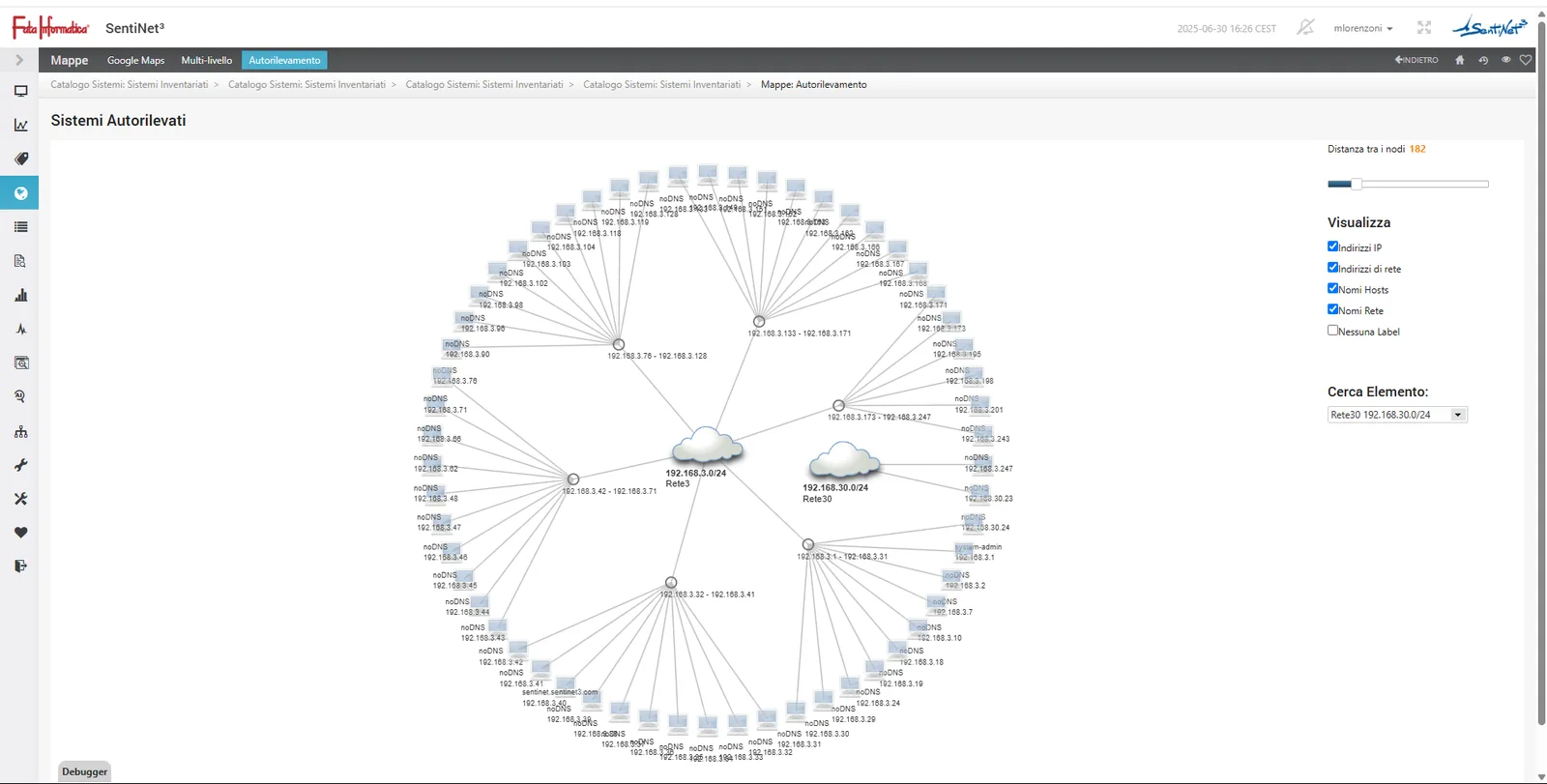
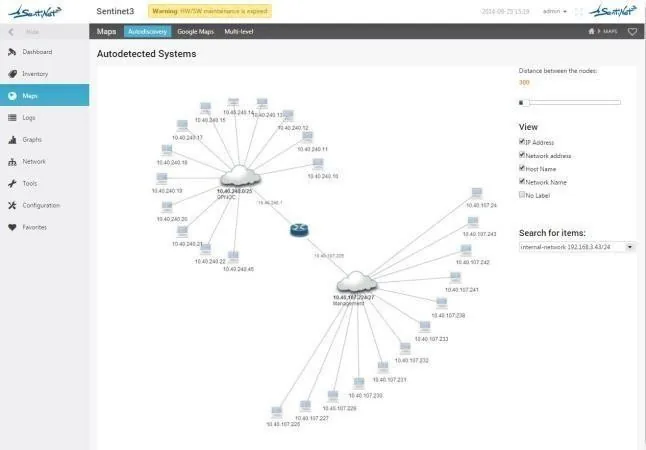
Automatically discovering hosts, services and relationships, and keeping knowledge of the infrastructure up to date. Autodiscovery identifies the elements to be managed, topology shows where they sit and what they depend on.
- Layer 2 scans (MAC, LLDP, SNMP traps) and layer 3 scans (IP, SSH, SNMP), in normal, fast or thorough mode.
- Finds “ghost” or unregistered devices, updates the inventory and notifies every new or unexpected resource.
- Scheduled searches to catch subsequent changes.
- Checks applied through Patterns and templates.
- Assets and connections reconstructed with SNMP, LLDP and CDP: devices, segments, VLANs and dependencies.
Multi-site and federation
Monitoring sites, data centers and remote systems while keeping a coordinated view of the whole, without losing the detail needed to work on the individual system.
- Host groups, maps and roles that reflect the territorial and technical structure.
- From the overall geographic view to the individual site, rack and service.
- Federated reading of domains belonging to different sites or management perimeters.
- Physical or virtual appliances distributed according to volumes, topology and operating requirements.
Native security: designed for high-security environments
Sentinet³ is designed to work in high-security environments, including classified ones. The Core integrates self-protection measures that limit the exposure of the monitoring system and govern access to the information collected, so that the observation tool does not itself become a point of exposure.
Learn more- Access: two-factor authentication (2FA) and an anti brute force mechanism.
- Web applications: internal Web Application Firewall (WAF).
- Network perimeter: integrated firewall.
- Data and secrets: advanced credential protection and encrypted file system.
- Configurations: advanced protection of configuration files and hardening against privilege escalation.
- Isolation: advanced application isolation.
Architecture and technology
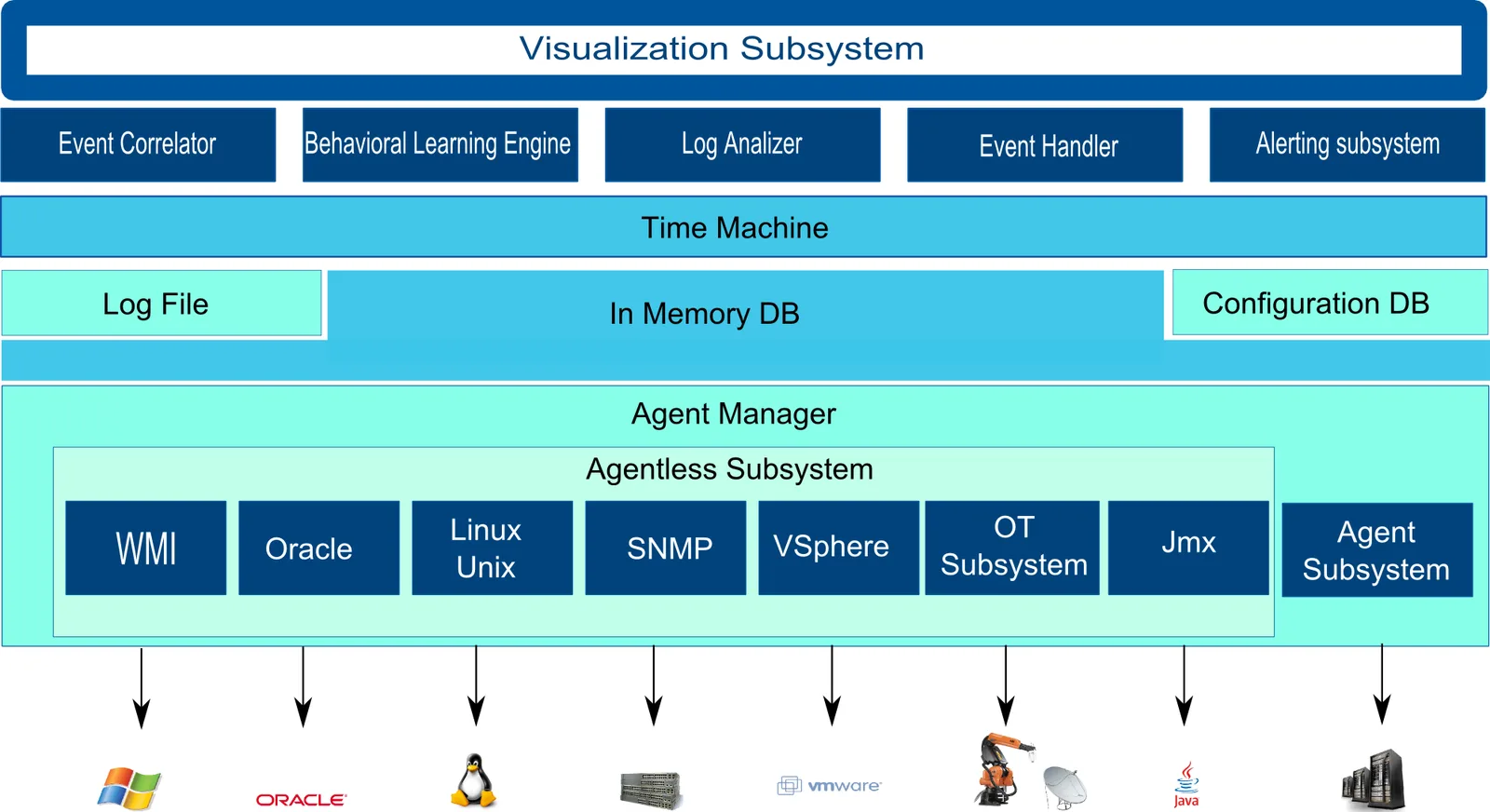
Visualisation, correlation, learning and notification subsystems work on an in-memory database and a configuration database, fed by a manager that collects data with agents and agentless.
- Responsive web portal
- In-memory processing
- Can be integrated with third-party systems
- Integrated with QR codes
Interoperability with heterogeneous systems
Standard protocols, agents, scripts and plug-ins bring different technologies into the same console and the same state model. Reusable Patterns and templates speed up the configuration of checks.
All compatibility- Windows
- Linux
- Unix
- HP-UX
- Solaris
- AIX
- AS/400
- VMware ESX
- Hyper-V
- Xen
- KVM
- Oracle
- SQL Server
- MySQL
- DB2
- PostgreSQL
- Tomcat
- WebSphere
- WebLogic
- JBoss
- Exchange
- SharePoint
- IIS
- Active Directory
- SNMP and traps
- WMI
- SSH
- NRPE and plug-ins
- HTTP
- SMTP
- TCP / UDP
- Syslog
The common foundation of Sentinet³ Infinity
The Core is the foundation on which the specialised modules of the Infinity line are built: Network Insight, Application Insight, Security Insight, Threat Insight and AI Insight reuse the same operational context and share the same console. Adoption can be gradual.
Discover Sentinet³ InfinityThe Core at work
Gradual saturation of a service, multi-site connectivity failure, abnormal temperature in the equipment room, a night-time anomaly, a new service to bring under control: typical situations that show how the Core improves prevention, diagnosis and recovery.
Go to the scenariosWant to see Sentinet³ on your infrastructure?
Tell us about your environment: sites, technologies, critical services. We will show you how Core and Infinity can work on your case.