
VMware ESX Monitoring
From ESX servers to individual virtual machines: resources, network, I/O latency and health status of the entire virtual infrastructure.
The whole virtual infrastructure, from host to VM
Monitoring of VMware ESX servers ranges from overall resource consumption and load data for hosts, clusters and datastores down to individual VMs and the applications running on them.
With the Sentinet³ VMware Server Pattern, administrators discover the entire virtual infrastructure and the health of each machine. The Pattern dynamically detects all the virtual machines on an ESX server and updates the data continuously, to keep pace with resources that are quickly reassigned and moved, as happens in every virtualised environment.
| At a glance | |
|---|---|
| Pattern | Sentinet³ VMware Server Pattern |
| Platform | VMware ESX servers and their virtual machines |
| Scope | Hosts, clusters, datastores, individual VMs and applications |
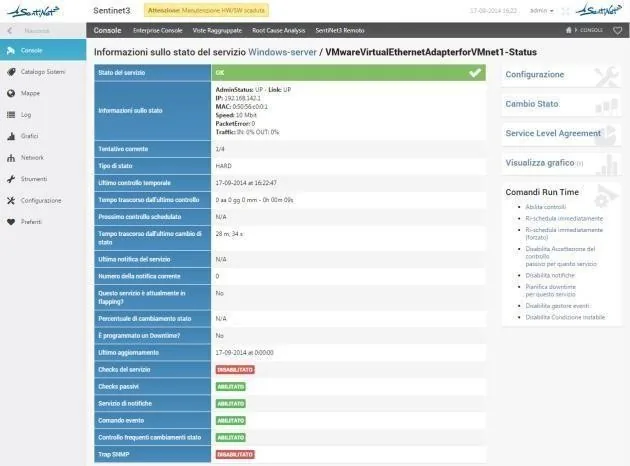
The Pattern’s checks
Every check has operator-configurable thresholds and sends notifications when values exceed them.
ESX server
| Check | What it verifies |
|---|---|
| Reachability | The server responds on the network |
| Swap | Swap usage, in MB |
| Mem | Percentage of memory in use |
| Overhead_mem | RAM cost in MB due to virtualisation |
| CPU | Percentage of CPU utilisation |
| NetUsage | Network traffic |
| Net_receive | Inbound throughput, in KB/s |
| Net_send | Outbound throughput, in KB/s |
| IO_queue | Disk write cache |
| Health | Status of CPU, storage, memory and sensors |
| Temperature | Temperature |
| StatusVM | List of VMware machines and their status |
| Nic | Network cards |
| IO_write_latency | Write latency, in ms |
| IO_read_latency | Read latency, in ms |
Virtual machines
| Check | What it verifies |
|---|---|
| VMvmware_ | Percentage of CPU in use |
| VMvmware_ | Percentage of memory in use |
| VMvmware_ | Active memory, in MB |
| VMvmware_ | Swap in use, in MB |
| VMvmware_ | Network traffic |
| VMvmware_ | I/O device usage, in MB |
| VMvmware_ | Virtual machine status |
| VMvmware_ | Inbound throughput, in KB/s |
| VMvmware_ | CPU wait time, in ms |
| VMvmware_ | Outbound throughput, in KB/s |
| VMvmware_ | Disk read latency, in ms |
| VMvmware_ | Disk write latency, in ms |
| VMvmware_ | VMware Tools status |
| VMvmware_ | Any host issues |
| VMvmware_ | Runtime connection status |
Practical help with troubleshooting
- Dynamic VM discovery: all the virtual machines on an ESX server are detected automatically.
- Always up-to-date data: monitoring follows reassigned and moved resources, typical of a virtualised environment.
- Threshold alarms: when the threshold values set on machine status are exceeded, Sentinet³ sends SMS and/or email.
Related topics
Want to see Sentinet³ on your infrastructure?
Tell us about your environment: sites, technologies, critical services. We will show you how Core and Infinity can work on your case.