
Windows Server Monitoring
Processes, resources, disks, services and event logs of Windows servers under control, so you can act as soon as a critical issue arises.
Preventing Windows server failures
Companies rely more and more on their IT networks. Monitoring them makes it possible to prevent server failures, detect excessive bandwidth consumption and calculate resource consumption, but proper, in-depth monitoring is laborious and time-consuming.
This is why Sentinet³ provides Server Patterns, packages of checks for the different types of server. The Sentinet³ Windows Server Pattern is dedicated to the Windows environment: it lets you follow each running process and see its status, the memory it uses and its CPU consumption, as well as disk usage.
| At a glance | |
|---|---|
| Pattern | Sentinet³ Windows Server Pattern |
| Sources | Processes, disks, services, Application event log |
| Scope | Server resources, processes, files, services, network interfaces |
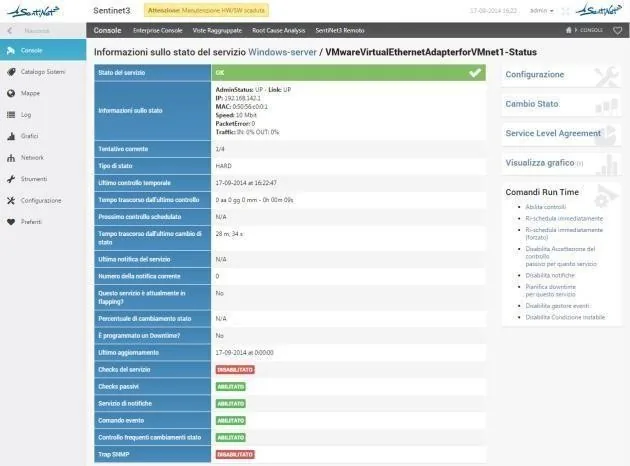
The Pattern’s checks
Every check has operator-configurable thresholds and sends notifications when values exceed them.
Server
| Check | What it verifies |
|---|---|
| Reachability | The machine responds on the network |
| Ram | Percentage of RAM in use |
| CPU | CPU utilisation |
| Proc | Running processes |
| ProcNum | Number of running processes |
| Disk | Percentage of disk space |
| Page_size | Size of a file |
| All_size_pages | Total size of all files |
| Page_age | Creation date of a file |
| Networks | Valid interfaces of the server |
| Uptime | Server uptime |
| All_Driver_size | Capacity of all the server’s disks |
| Event_Log_Application | Application log events in the last 4 hours |
| Service_OK | Services configured for automatic start |
| CPU_queue_5 | CPU processing queue |
Network interfaces
With a single query to the server, the Pattern returns this information for each interface.
| Check | What it verifies |
|---|---|
| Status | Interface status, up or down |
| IP address | IP address of the interface |
| MAC | MAC address of the interface |
| Speed | Interface speed, in Mbit |
| Packet Error | Number of packets with errors |
| Traffic | Inbound and outbound traffic |
What it enables you to do
- Prevent server failures before they turn into downtime.
- Detect excessive bandwidth consumption and calculate resource consumption.
- Act on the individual process: the status, memory and CPU of each process, together with disk usage, show where to intervene when a critical issue is triggered.
Related topics
Want to see Sentinet³ on your infrastructure?
Tell us about your environment: sites, technologies, critical services. We will show you how Core and Infinity can work on your case.